

Nosmai / docs
Nosmai Effects Nosmai Moderation Nosmai Try-ons coming soon
Docs menu Cloud filters
docs / nosmai effects / guide / cloud filters

Cloud filters

Build a responsive cloud catalog, request filters by type, paginate, download safely, cache packages, apply local files, and handle repeated taps and closed screens.

Overview

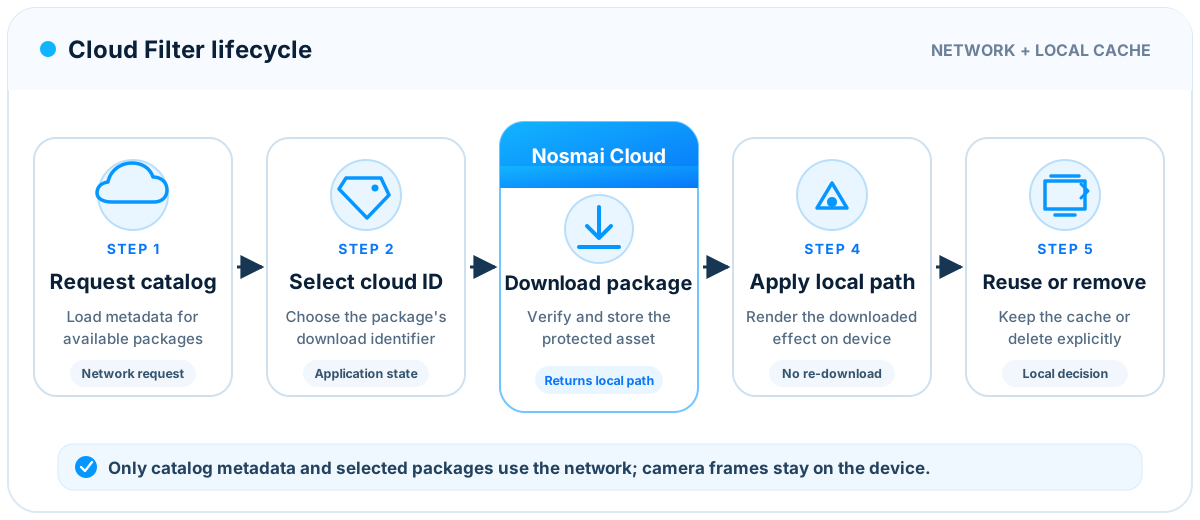
Nosmai Cloud lets an application show filters, effects, packaged beauty looks, and backgrounds without including every .nosmai file in the initial application download.

The catalog returns metadata and preview URLs. The protected .nosmai package is downloaded only when it is required. After download, the application applies the returned local file path through the same applyEffect(path) method used for bundled packages.

Request catalog metadata
    |
    v
Render names and previews
    |
    v
Download the selected package
    |
    v
Receive and validate a local path
    |
    v
Call applyEffect(localPath)
    |
    v
Confirm selected state from the SDK

Camera frames are not uploaded to list, download, or apply a cloud package.

Requirements

Before requesting cloud filters:

  1. Initialize the SDK successfully.
  2. Use a license that includes cloud filters.
  3. Keep internet access available for catalog requests and downloads.
  4. Keep enough application storage available for the downloaded package.
  5. Use the cloud catalog version supported by the installed SDK.

Cloud catalog schema 2.0.0 is the current default. It is separate from Android SDK 3.0.1, iOS SDK 3.0.0, and Flutter package 3.0.6.

An already downloaded and cached package can be applied from its local path without downloading it again. License rules still apply.

Cloud categories

The application should use the platform enum or normalized category where one is available.

Interface sectionPackage manifest typeCloud request valueFlutter enum
FiltersfilterfilterNosmaiCloudFilterType.filter
EffectseffecteffectsNosmaiCloudFilterType.effects
Beautybeauty_effectbeauty_effectNosmaiCloudFilterType.beautyEffect
BackgroundsbackgroundbgNosmaiCloudFilterType.background

Cloud request categories and package manifest types are related but not identical. Do not write a cloud request value into a package manifest. The protected package manifest must use filter, effect, beauty_effect, or background.

Track cloud state per filter identifier:

notDownloaded
downloading
downloaded
applying
selected
failed

Also track the catalog request separately:

idle
loadingFirstPage
showingCachedData
loadingNextPage
refreshing
failed

Recommended behavior:

  • Show cached metadata immediately when the platform provides it.
  • Refresh the catalog away from the UI thread.
  • Keep one current catalog request for each catalog screen or controller.
  • Keep one in-flight download for each cloud identifier.
  • Ignore repeated taps while that item is downloading or applying.
  • Mark an item selected only after apply succeeds.
  • Confirm selection from the active-state listener.
  • Keep the completed download cached even if its sheet closed during download.
  • Do not update a disposed screen when a request finishes.
  • Offer retry for temporary network failures.
  • Do not delete other categories while processing a scoped or paginated response.

Flutter

List all categories

final nosmai = NosmaiFlutter.instance;
final filters = await nosmai.getCloudFilters();

Calling the method without a page requests all available pages for backward compatibility. For a large catalog, request one page at a time.

List one category with pagination

final filters = await nosmai.getCloudFilters(
  filterType: NosmaiCloudFilterType.background,
  version: NosmaiCloudFilterVersion.v2,
  page: 1,
  limit: 20,
  fetchAllPages: false,
);

final pagination = nosmai.lastPaginationInfo;

Load the next page only when it exists:

if (pagination?.hasNextPage == true) {
  final nextPage = await nosmai.getCloudFilters(
    filterType: NosmaiCloudFilterType.background,
    page: pagination!.currentPage + 1,
    limit: pagination.itemsPerPage,
    fetchAllPages: false,
  );

  // Merge by cloudIdentifier to avoid duplicate cells.
}

Do not start a second next-page request while the first one is still running.

Download and apply

Use cloudIdentifier, not the catalog record id, for download and cache operations:

final filter = filters.first;
final result = await nosmai.downloadCloudFilter(
  filter.cloudIdentifier,
);

final path = (result['path'] ?? result['localPath']) as String?;
if (path == null || path.isEmpty) {
  throw StateError('Cloud filter download returned no local path');
}

final applied = await nosmai.applyEffect(path);
if (!applied) {
  // Keep the previous selected state and offer retry.
}

cloudIdentifier preserves compatibility with catalogs that expose separate record and downloadable-package identifiers.

Remove the cached download when the user explicitly requests it:

await nosmai.removeCloudFilter(filter.cloudIdentifier);

Removing a cached file is different from clearing an active render slot. If the item is active, remove its visual state through removeEffect(filter) or the correct narrow clear method as well.

Protect a closing screen

An asynchronous request can finish after its sheet or route is disposed. Check ownership before changing widget state:

if (!context.mounted) return;

Keep download futures in a map keyed by cloudIdentifier. Reuse the existing future for repeated taps and remove it from the map when it completes.

Android

Android exposes cloud operations through NosmaiCloud.

Show cached data without freezing the sheet

NosmaiCloud.cachedList() is an immediate snapshot intended for rendering existing catalog data. It does not perform a network request.

List<NosmaiCloud.Item> cached = NosmaiCloud.cachedList();
List<NosmaiCloud.Item> visible = new ArrayList<>();

for (NosmaiCloud.Item item : cached) {
    if ("bg".equals(item.category) ||
        "background".equals(item.category)) {
        visible.add(item);
    }
}

renderCloudItems(visible);

Filter a cached snapshot by the active tab before rendering it. An All snapshot must not be displayed unchanged inside the Filters or Backgrounds tab.

Do not call a network-backed catalog refresh on the main thread. Refresh through an executor and post only the result back to the UI:

private final ExecutorService cloudExecutor =
        Executors.newSingleThreadExecutor();
private final Handler mainHandler =
        new Handler(Looper.getMainLooper());
private final AtomicLong cloudRequest = new AtomicLong();

private void loadBackgrounds() {
    long request = cloudRequest.incrementAndGet();

    NosmaiCloud.FilterQuery query =
            new NosmaiCloud.FilterQuery();
    query.filterType = "bg";
    query.page = 1;
    query.limit = 20;
    query.fetchAllPages = false;
    query.cleanupRemoved = false;

    cloudExecutor.execute(() -> {
        boolean success = NosmaiCloud.fetch(query);
        List<NosmaiCloud.Item> items = success
                ? NosmaiCloud.list()
                : Collections.emptyList();

        mainHandler.post(() -> {
            if (request != cloudRequest.get() || isFinishing()) {
                return;
            }

            if (success) {
                renderCloudItems(items);
            } else {
                showCloudRetry();
            }
        });
    });
}

Increase cloudRequest when the user changes tab, closes the sheet, or starts a new refresh. This prevents an old response from replacing a newer interface state.

Keep cleanupRemoved false for a category-specific or single-page request. Such a response is not the complete server catalog and must not be used to remove cached items from other categories or pages.

Download and apply

NosmaiCloud.download performs the package transfer away from the calling UI flow. Its callbacks must still be marshalled to the main thread before changing views.

NosmaiCloud.download(
    item.id,
    progress -> mainHandler.post(
        () -> updateDownloadProgress(item.id, progress)
    ),
    (filterId, success, localPath, error) -> {
        if (!success || localPath == null || localPath.isEmpty()) {
            mainHandler.post(() -> showDownloadRetry(filterId));
            return;
        }

        NosmaiEffects.applyEffect(
            localPath,
            new NosmaiEffects.EffectCallback() {
                @Override
                public void onSuccess() {
                    // Confirm final UI from the pipeline listener.
                }

                @Override
                public void onError(String message) {
                    mainHandler.post(
                        () -> showApplyRetry(filterId)
                    );
                }
            }
        );
    }
);

Keep a thread-safe set of downloading identifiers. If the set already contains item.id, ignore the repeated tap. Remove the identifier in both success and failure paths.

When the owning screen is destroyed, increment the request generation, remove listeners, and stop the executor if it is owned by that screen. A completed package can remain in the SDK cache for the next screen.

iOS

The iOS effects engine provides asynchronous catalog, progress, download, and apply callbacks.

Request one category

NosmaiCloudFilterRequestOptions *options =
    [NosmaiCloudFilterRequestOptions defaultOptions];
options.filterType = @"bg";
options.version = NosmaiCloudFilterVersion2;
options.page = 1;
options.limit = 20;
options.fetchAllPages = NO;
options.cleanupRemovedFilters = NO;

[[NosmaiCore shared].effects
    getCloudFiltersWithOptions:options
                    completion:^(NSArray<NSDictionary *> *filters,
                                 NosmaiCloudFilterPaginationInfo *pagination,
                                 NSError *error) {
        dispatch_async(dispatch_get_main_queue(), ^{
            if (error != nil) {
                [self showCloudRetry];
                return;
            }

            [self renderCloudFilters:filters pagination:pagination];
        });
    }];

Use effects, filter, beauty_effect, or bg for a scoped request. Use nil to request all categories.

Download and apply

NSString *filterId = filter[@"filterId"] ?: filter[@"id"];

[[NosmaiCore shared].effects
    downloadCloudFilter:filterId
               progress:^(float progress) {
        dispatch_async(dispatch_get_main_queue(), ^{
            [self updateDownloadProgress:progress filterId:filterId];
        });
    }
             completion:^(BOOL success,
                          NSString *localPath,
                          NSError *error) {
        if (!success || localPath.length == 0) {
            dispatch_async(dispatch_get_main_queue(), ^{
                [self showDownloadError:error filterId:filterId];
            });
            return;
        }

        [[NosmaiCore shared].effects
            applyEffect:localPath
             completion:^(BOOL applied, NSError *applyError) {
                dispatch_async(dispatch_get_main_queue(), ^{
                    [self finishApply:applied error:applyError];
                });
            }];
    }];

Keep one in-flight operation per filter identifier. Capture the screen or request owner weakly in production code so a completed callback does not keep a closed sheet alive.

Remove a cached download only when requested:

BOOL removed =
    [[NosmaiCore shared].effects removeCloudFilter:filterId];

Applying and clearing rules

The downloaded local path uses the normal package policy:

  • A new filter replaces the active external color filter.
  • effect and beauty_effect share the AR slot and replace each other.
  • A new background package replaces the previous background package.
  • Built-in beauty, makeup, reshape, color, and hair controls are mutually exclusive with effect and beauty_effect.
  • A regular external filter can remain active with an AR package, background, or built-in beauty.
  • An AR effect that owns its background can replace existing background content.

Use the active-state listener after apply and removal. Do not decide selected UI only from a tap or downloaded filename.

Error handling

FailureRecommended response
Cloud feature not licensedHide or disable cloud entry points and explain the plan requirement
First page failsShow cached data if available and provide Retry
Next page failsKeep existing items and retry only that page
Download interruptedKeep the item unselected and offer Retry
Local path is emptyTreat download as failed and do not call applyEffect
Apply failsPreserve the previous active selection and show a retry action
Sheet closes during workLet safe cache work finish but ignore UI updates for the disposed owner
Repeated tapReuse or ignore the existing operation for that identifier
Cached file was deletedDownload again and refresh metadata

Do not show backend payloads, full local paths, access tokens, or license keys to the end user.

Test checklist

Before release, test:

  1. All, Filters, Effects, Beauty, and Background tabs.
  2. Empty categories and empty search results.
  3. First page, next page, refresh, and end-of-list behavior.
  4. Cached data followed by a background refresh.
  5. Download success, network loss, retry, and low storage.
  6. Rapid repeated taps on one item.
  7. Downloads of different items at the same time if the interface allows them.
  8. Closing and reopening the sheet during a download.
  9. Applying a downloaded item and reusing it after relaunch.
  10. Removing the active package without deleting unrelated downloads.
  11. Removing a cached download and downloading it again.
  12. Package coexistence and replacement rules.
  13. Offline launch after the catalog and selected package were cached.
  14. Slow networks and large catalogs without blocking the camera preview.

Continue with Filters and effects for package slots and Errors and troubleshooting for failure diagnosis.

Nosmai

We make advanced camera and AI technology accessible to every developer. By packaging hard problems into simple

developers
legal
newsletter

Product updates and release notes. No spam.

© 2026 nosmai, inc · all rights reserved