



 Nosmai Asset Store Browse and license ready-made effects and 3D assets.
  Console Create projects, manage keys and track usage.
  Free effects pack A starter set of filters to drop into your first build.
  Contact us for assistance Custom volume, OEM, white-label or technical scoping.
 What Nosmai Effects is
Nosmai Effects is a camera effects SDK for adding real-time beauty, makeup, backgrounds, AR experiences, and processed media output to an app. Your app owns its interface and media flow, while the SDK provides the documented camera and effect controls.
There are two main ways to add a visual result:
- use direct SDK controls for adjustable features such as beauty or background
- select and download an approved Cloud Filter
The app lists its approved Cloud Filter catalog and downloads an item when the user selects it. A Cloud Filter can also contain triggers that make its visual content react to supported user actions without extra gesture code in the app.
Essential terminology
| Term | Definition |
|---|---|
| SDK | A ready-made software kit that developers add to an app |
| AR | Digital content placed into the live camera view, such as a face mask or tracked object |
| Cloud Filter | An approved effect that the app downloads when needed instead of shipping inside the original app |
| Processed preview | The live camera view after Nosmai has applied the active effects |
| App-bound licence key | A project key created for one specific Android app, iOS app, or Web origin |
Start building
Choose your platform and follow its quickstart to initialize the SDK, open a processed camera preview, and apply your first visible effect.
If Nosmai Effects is not installed yet, start with the matching installation guide. You also need an app-bound license key from Nosmai Console.
Product capabilities
Nosmai Effects combines adjustable camera controls with Cloud Filters. Your app owns its interface and media flow while the SDK processes the camera or input frames.
| Capability | What it adds |
|---|---|
| Beauty and makeup | Skin retouching, face shaping, lipstick, eyeshadow, blush, lashes, and brows |
| AR effects | Face masks, stickers, particles, animated overlays, colour effects, and 3D content |
| Backgrounds | Blur, colour, image, video, and authored background replacement |
| Cloud Filters | Browse, download, cache, apply, and remove approved effects |
| Capture and output | Processed photos, recordings, frames, textures, and live-streaming output |
| Authored stickers and overlays | Images, text, particles, and animated props delivered through Cloud Filters |
A growing catalog of ready-made filters is available through the Nosmai Asset Store. Filters are delivered separately from the SDK binary and downloaded at runtime through Cloud Filters.
Read filters and effects to choose between direct controls and Cloud Filters. Read triggers for authored reactions.
How it works
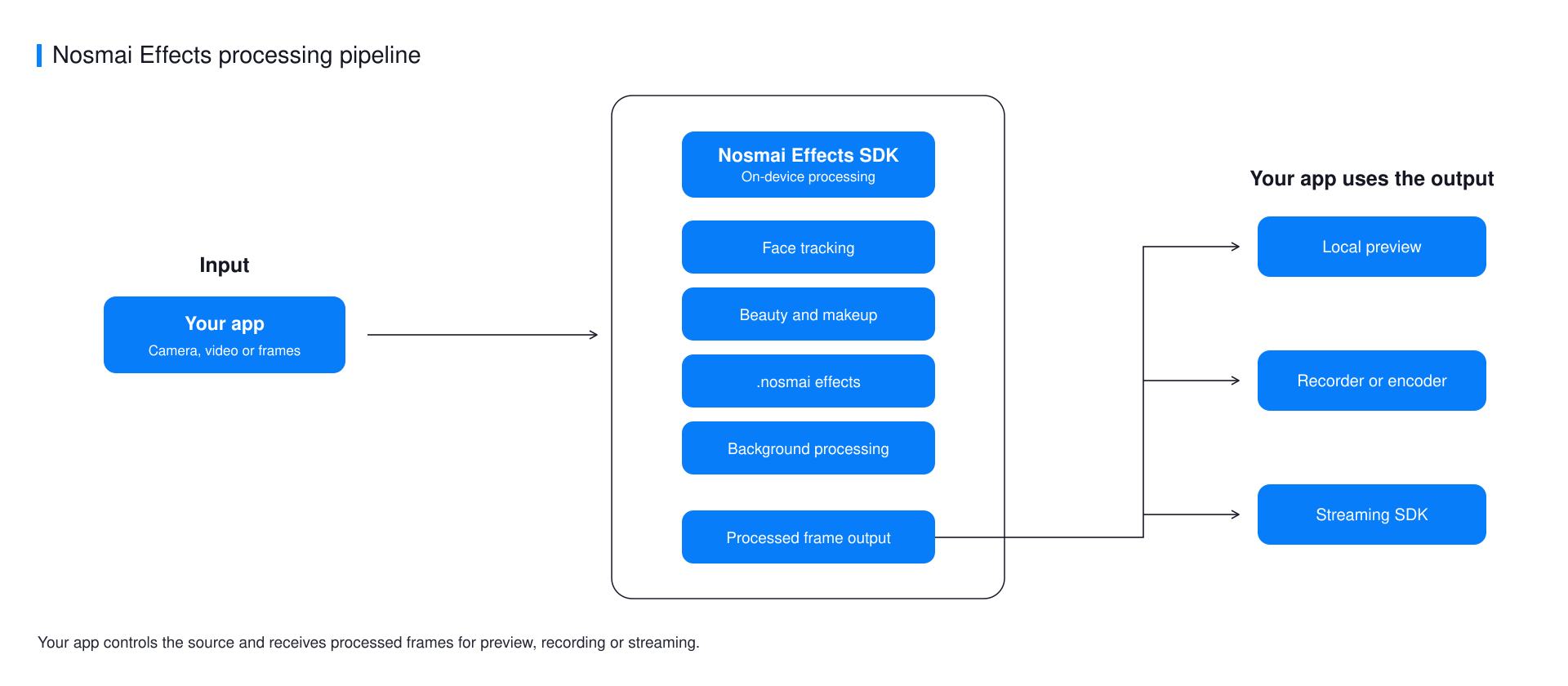
Only the processing stages required by the active feature are enabled. Native iOS and Android use GPU-accelerated processing, while Flutter and React Native connect to the same native SDKs through their platform packages.
Read how the pipeline works for frame ordering, effect composition, and output ownership.
Platform availability
| Platform | Current package | Status |
|---|---|---|
| iOS | NosmaiCameraSDK 3.0.5 | Supported |
| Android | nosmai-sdk-3.0.5.aar | Supported |
| Flutter | nosmai_effects_sdk 1.0.3 | Supported |
| React Native | @nosmai/react-native-effects-sdk 1.0.0 | Supported |
| Web | @nosmai/web-sdk 0.2.0 | Developer preview |
Use platform support to compare individual features, system requirements, native artifact sizes, and release status.
Before production
- Test camera and rendering behaviour on physical arm64 iOS devices and supported
arm64-v8aorarmeabi-v7aAndroid devices. - Use the final signed application ID, bundle identifier, or Web origin when creating the license key.
- Keep one active camera owner and release it before opening another camera screen.
- Test the exact Cloud Filters used by the application on every target platform.
- Measure frame rate, memory, battery, and temperature with the final effects and camera resolution on the intended device range.
Android SDK 3.0.5 provides arm64-v8a for 64-bit ARM devices and armeabi-v7a for 32-bit ARM devices on API 24 or later. The current iOS framework remains intended for physical arm64 devices and has no Simulator slice. React Native 1.0.0 is supported for its documented compatibility baseline. The Web developer preview does not yet provide full mobile feature parity.
Next steps
- Compare platforms and features
- Create and apply a license key
- Install the SDK
- Apply your first effect
- Troubleshoot an integration
