



What Cloud Filters are
Cloud Filters are approved Nosmai effects that your app lists and downloads at runtime. They are useful for a large or frequently changing catalog because adding an approved item does not require a new App Store or Play Store release.
After download, the Nosmai Effects runtime applies the selected filter on the device.
| Term | Meaning |
|---|---|
| Asset Store | The collection of ready-made Nosmai effects available for a project |
| Cloud catalog | The project-approved items returned to the app by the Cloud Filters API |
| Cloud Filter | One downloadable effect in the approved cloud catalog |
Cloud Filters must be enabled for the project and allowed by its licence. An app should hide or disable cloud-only UI when the capability is unavailable.
How the lifecycle works
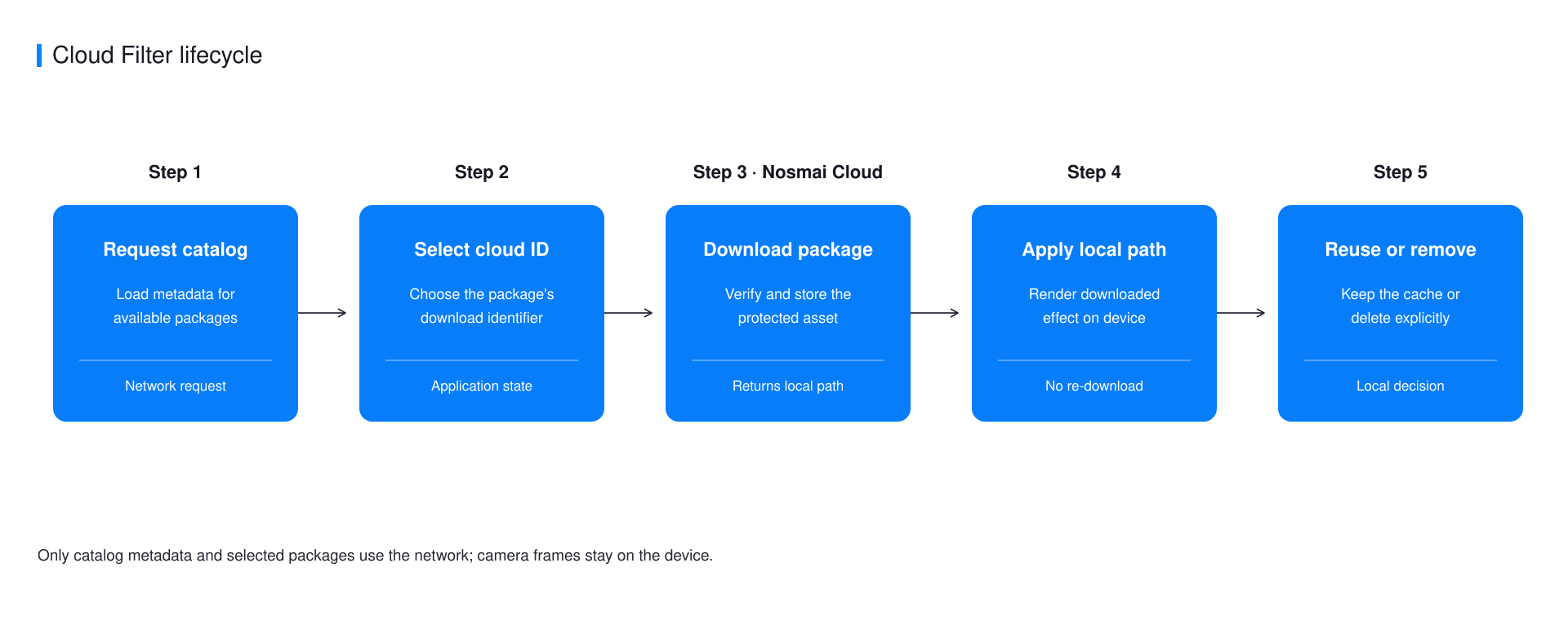
- The app requests its approved catalog and displays names and previews.
- The user selects an item by its documented cloud filter ID.
- The SDK downloads and validates the selected Cloud Filter.
- On success, the app applies the returned SDK-managed download.
- The SDK can reuse the cached filter until it is removed or reclaimed.
Catalog metadata and the selected filter use the network. Camera frames are not uploaded as part of listing, downloading, or applying a Cloud Filter.
Categories and identifiers
The catalog can be filtered by the public categories supported by each SDK, including effects, filters, backgrounds, and beauty effects. Use the typed category or request value documented for that platform.
Use the cloud filter ID returned by the catalog for download, cache checks, and removal. Do not substitute a display name, preview URL, list position, or a locally generated identifier.
Download and cache behaviour
- Treat download completion as the source of truth.
- Apply only the successful download result returned by the SDK.
- Prevent repeated taps from starting duplicate downloads for the same ID.
- Show progress when available, but decide success from completion.
- Keep the current effect active if a replacement download fails.
- Check cache availability again when the user selects an item.
- Store the cloud filter ID in app state, not a filesystem path.
A returned path belongs to SDK-managed storage. It is not a permanent app-data location, and the operating system can reclaim cached files. Download the item again when the cache check says it is missing.
Offline behaviour
An item that is already cached can be applied without downloading it again. An item that has never been downloaded is unavailable offline, and refreshing the catalog requires a network connection. Licence policy continues to apply.
An item must be downloaded before its first use. Previously cached items remain available offline while their SDK-managed cache entries are present.
App responsibilities
Your app owns the catalog UI, selection state, retry messages, and any product rules around downloading or removing items. The SDK owns the filter download, validation, managed cache, and effect application.
Do not prefetch an entire catalog unless the product experience requires it. Downloads use network data and device storage, so provide deliberate download and removal behaviour.
Next steps
- Download a Cloud Filter
- Choose bundled or cloud delivery
- Review platform support
- Troubleshoot downloads
