



When to use it
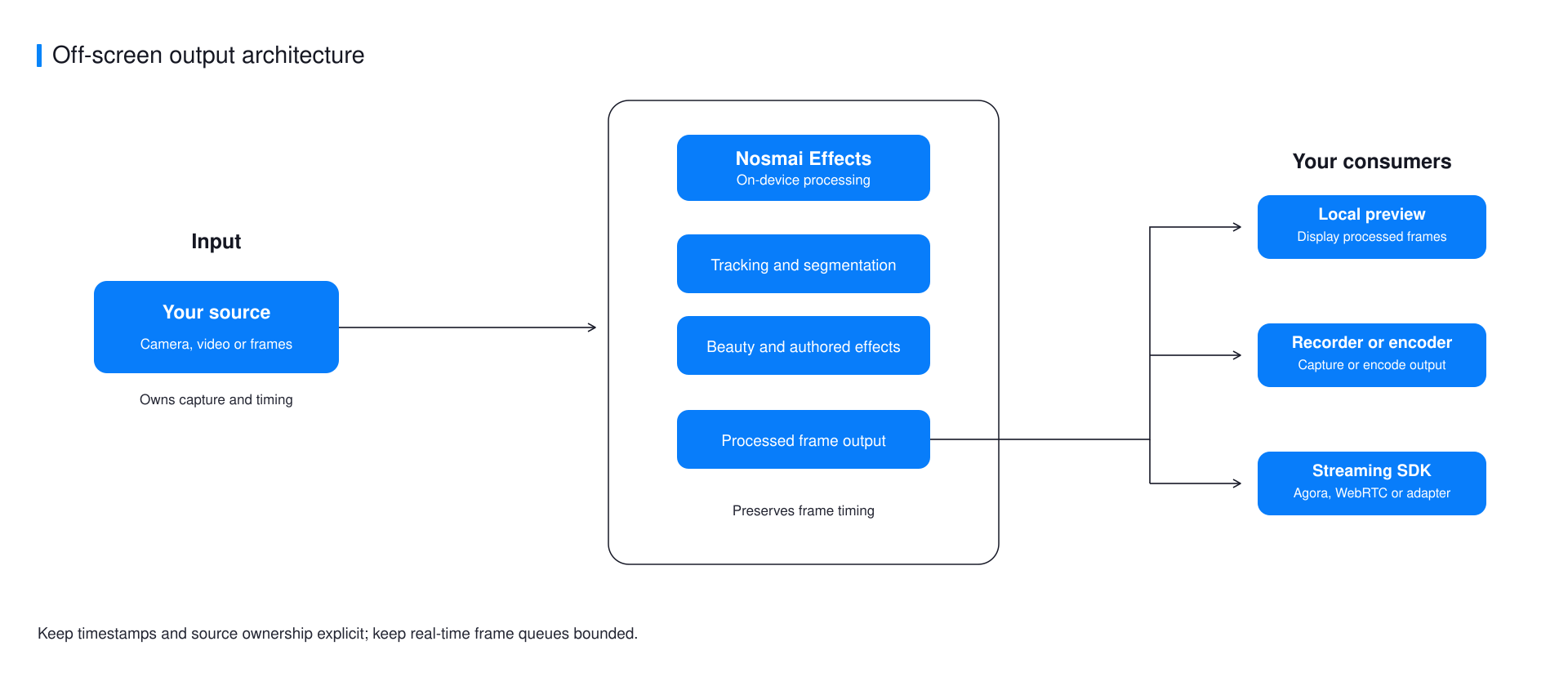
Use off-screen rendering when Nosmai does not own the final display or media transport. Common cases include a custom camera source, a WebRTC encoder, a video-call SDK, or a server upload pipeline that already consumes native frames.
Nosmai produces the effected image and passes it to another system instead of displaying it directly. That system might record it, send it into a video call, or upload it. Standard camera-preview screens do not need this workflow.
An encoder prepares video for recording or transmission. WebRTC is a common real-time audio and video technology used by calling apps.
Supported native paths
| Platform | Input or output | Format |
|---|---|---|
| Android external input | Synchronous processed planes | Direct planar I420 buffers with explicit strides |
| Android camera output | CPU callback or shared GPU texture | SDK frame metadata or EGL-shared texture |
| iOS external input | Submitted pixel or sample buffers | kCVPixelFormatType_32BGRA |
| iOS camera output | Processed live-frame callback | CVPixelBufferRef |
| Flutter | Maintained provider bridge | Native GPU texture on Android and CVPixelBuffer on iOS |
| React Native | Bounded analysis sampling only | Base64 i420, rgba8888, bgra8888, or nv12 |
React Native sampling is limited to 1 through 5 FPS and is not a live-streaming transport. The public Flutter API does not accept arbitrary external I420 or pixel-buffer input.
Frame ownership
Real-time output needs clear ownership:
- Keep at most one expensive operation in progress.
- Keep the newest waiting frame instead of building a queue.
- Preserve the input timestamp for the downstream encoder.
- Retain an iOS output buffer only when the consumer outlives the callback.
- Return every Android texture slot after sampling it.
- Clear callbacks before releasing the camera or graphics context.
Preview and processed output
Android provides PREVIEW_ONLY, STREAMING_ONLY, and DUAL_OUTPUT render modes. iOS provides a live processed-frame callback while the normal camera is running. Dual output costs more than preview alone, so measure the combined effect and encoder load on target hardware.
Streaming compatibility
| Consumer | Status | Route |
|---|---|---|
| Agora | Verified | Native and Flutter guides |
| LiveKit | Verified | Native and Flutter guides |
| Raw WebRTC | Verified on native Android and iOS | Native guides and examples |
| Other video SDKs | Integration-dependent | Use a custom video source that accepts the documented native format |
Do not describe an untested provider as verified. Format, orientation, timestamp, and buffer ownership must be validated with the exact provider version used by the application.
Next steps
- Render frames off-screen in Android
- Render frames off-screen in iOS
- Choose a live-streaming integration
- Stream Flutter effects through Agora
- Stream Flutter effects through LiveKit
- Review performance limits
