



Nosmai Studio is a desktop app for designing AR camera filters: beauty and makeup, face and hand attachments, 3D models, backgrounds, colour grades, shaders, and small games. You build a filter as editable layers, preview it live on your own camera, check its performance, and export a .nosmai package the Nosmai SDK can run. No code is required for most filters.
Product: Nosmai Studio · Platform: macOS and Windows desktop · Updated: 6 October 2026 · Reading time: 5 minutes
What you can make
A filter in Studio is a stack of layers, each one a thing the SDK draws or applies. You can mix as many as you like in one filter:
| Layer | What it does |
|---|---|
| Beauty | Skin smoothing, makeup, face shaping, and eye colour in one layer |
| Face or hand attachment | A 3D model, image, or video pinned to a tracked face or hand |
| Text | Words over the frame, including values a game script sets live |
| Background | Blur the background, or replace it with an image or video |
| Colour | A .cube LUT or a full-frame grade over the whole picture |
| Shader | Author-written GLSL that runs before 3D, after 3D, or on a face mask |
| Hair | Recolour, hide, or shade tracked hair |
| Audio | A sound that plays with the filter |
| Game | A Lua-scripted mini-game driven by face gestures such as a blink |
Everything you build stays editable. Opening a template or a saved project loads its layers back exactly as they were authored.
How a filter comes together
The Studio workflow is the same whatever you build:
- Start a filter from a start point or a template.
- Add and arrange layers in the Layers panel, and set each layer's properties in its inspector.
- Preview it live on your own camera (the default preview source).
- Check performance on the Performance view before you ship.
- Export a
.nosmaipackage, plus optional preview images and video.
The filter you export does not belong to any one app. A developer adds it to their app through the Nosmai SDK or through Cloud Filters later, so you can design a filter without knowing where it will run.
Learn by opening a template
The fastest way to see what a filter is made of is to open one that already works. Three templates ship with Studio, each a complete, editable filter:
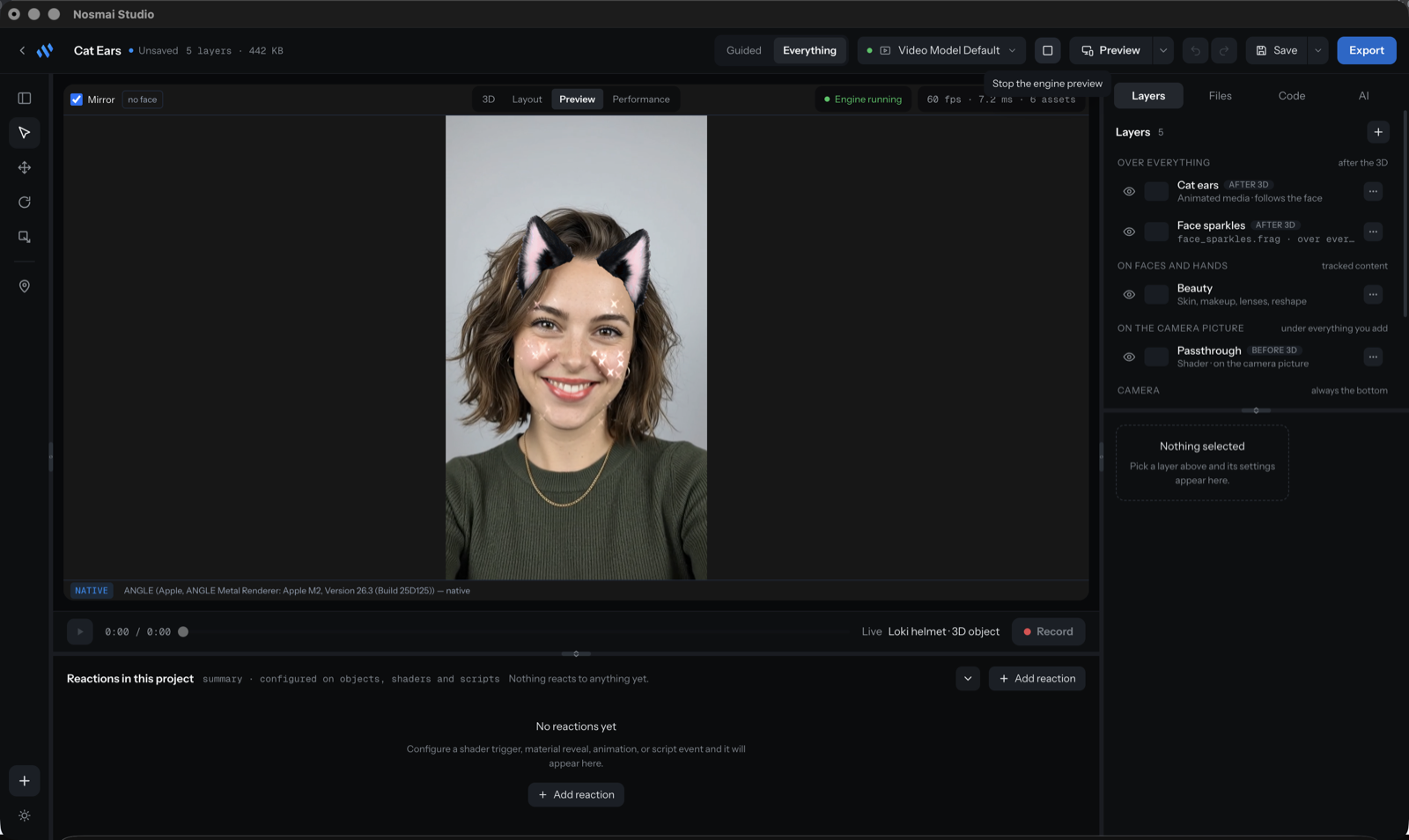
- Cat Ears: face-attached animated ears, a sparkle shader, and beauty, all running together.
- BlinkFlyer: a mini-game you play by blinking, with live score and lives text.
- Loki Magic: a 3D helmet pinned to the face, revealed by a long blink.
Open one from the Templates gallery and take it apart. Nothing in a template is locked.
What you need
- Install Nosmai Studio and sign in with your Nosmai account. See Install and sign in.
- Use a machine with a working camera. The preview opens on your camera so you can see the filter on a real face.
- No programming is needed for beauty, attachments, backgrounds, colour, or text filters. Shaders and games use GLSL and Lua, and live in the Code panel.
How Studio relates to the SDK
Studio is where a filter is authored; the Nosmai SDK is what a developer integrates into an app to run it. Export produces the package file, and a developer or the Nosmai Console delivers it to an app. See What happens after export for the ship path, and the Nosmai Effects documentation for SDK integration.
