



Prerequisites
- A working Flutter quickstart
- An Agora project, token flow, and broadcaster permissions
The streaming path
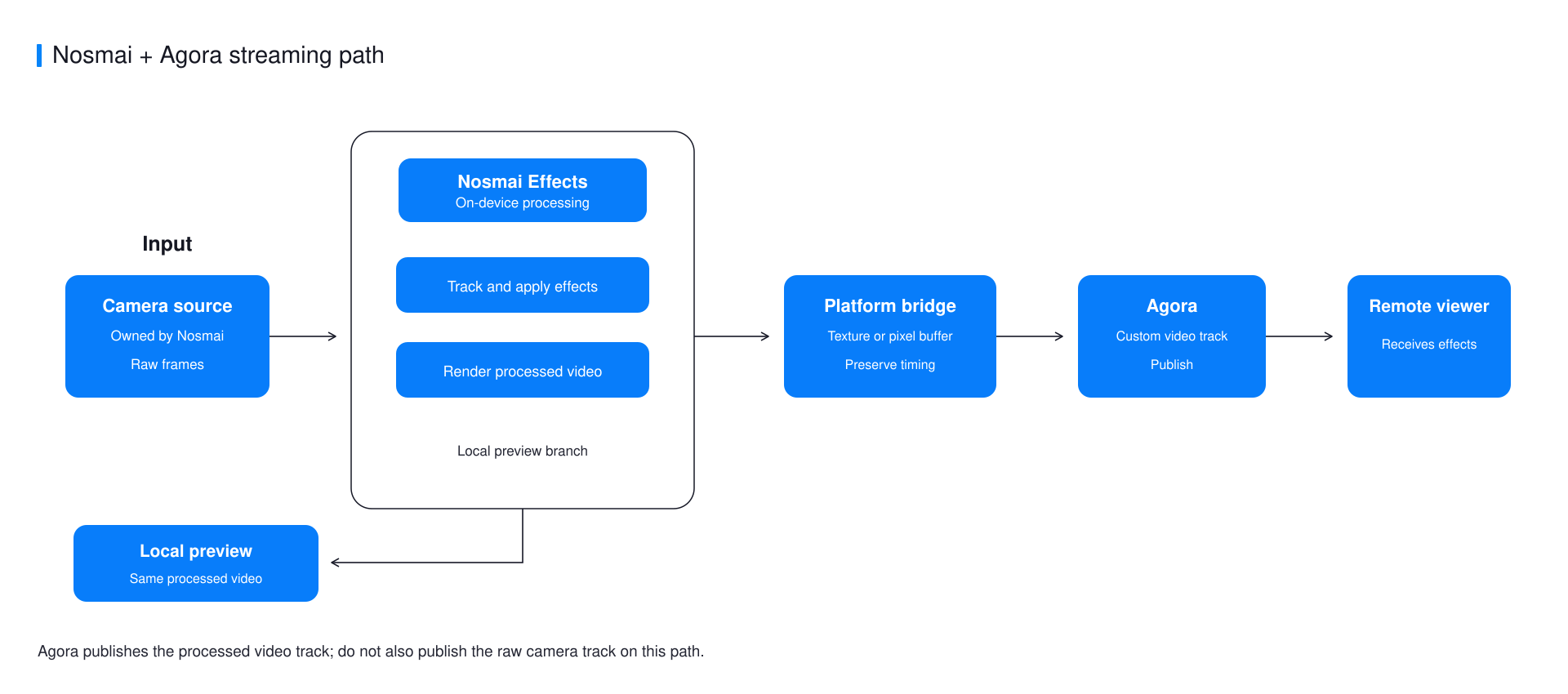
Nosmai owns and processes the camera feed. Agora publishes only the processed output while the application keeps its local preview and session controls.
Install the packages
dependencies:
  nosmai_effects_sdk: ^1.0.3
  nosmai_agora_bridge:
    git:
      url: https://github.com/nosmai/nosmai_agora_bridge.git
  agora_rtc_engine: ^6.5.3
Declare and request camera and microphone permissions on both platforms.
Use the required initialization order
Create the shared native engine before Nosmai creates its graphics context:
final handle = await NosmaiAgoraBridge.getNativeHandle(
  agoraAppId: agoraAppId,
);

final initialized = await NosmaiFlutter.initialize(nosmaiLicenseKey);
if (!initialized) {
  throw StateError('Nosmai initialization was not accepted');
}

final engine = createAgoraRtcEngine(sharedNativeHandle: handle);
Calling NosmaiFlutter.initialize first can leave Android remote video black. On iOS, using the bridge handle also prevents two Dart wrappers from driving conflicting native engine state.
Configure a portrait stream
await engine.initialize(RtcEngineContext(appId: agoraAppId));
await engine.enableVideo();
await engine.enableAudio();

await engine.setVideoEncoderConfiguration(
  const VideoEncoderConfiguration(
    dimensions: VideoDimensions(width: 720, height: 1280),
    frameRate: 30,
    orientationMode: OrientationMode.orientationModeFixedPortrait,
  ),
);
Start streaming
final started = await NosmaiAgoraBridge.startStreaming(
  channelName: channelName,
  token: token?.isEmpty == true ? null : token,
  uid: uid,
);
The bridge joins with a custom video track. Do not also join or publish the raw camera on this path. Guard the button against duplicate starts.
Stop and dispose
await NosmaiAgoraBridge.stopStreaming();
if (!Platform.isIOS) {
  await engine.leaveChannel();
}

await engine.release();
await NosmaiAgoraBridge.disposeNative();
Call stopStreaming for each session. Release the engine and bridge only when the whole live experience is being torn down.
Common errors
| Symptom | Cause | Fix |
|---|---|---|
| Local preview works but remote video is black | The shared native handle was created too late or ignored | Call getNativeHandle before Nosmai initialization and wrap the same handle |
| Second live session freezes | The first bridge session was not stopped | Pair every successful start with stopStreaming |
| Remote video is cropped | Encoder aspect or orientation differs from 720 by 1280 portrait output | Use fixed portrait and do not override it later |
| iOS camera switch loses output | The bridge was not notified | Call NosmaiAgoraBridge.notifyCameraSwitch() after switching |
Verify it worked
Apply a visible effect, join from a second device, and confirm the remote video is filtered, portrait-oriented, and stable after stop and rejoin.
Next steps
- Compare live-streaming routes
- Understand off-screen rendering
- Review Flutter installation requirements
