



Prerequisites
- A working Flutter quickstart
- A LiveKit server URL and participant token
- iOS 15 or later, or Android API 24 or later
- A physical arm64 iOS device, or an Android device that supports
arm64-v8aorarmeabi-v7a
Streaming path
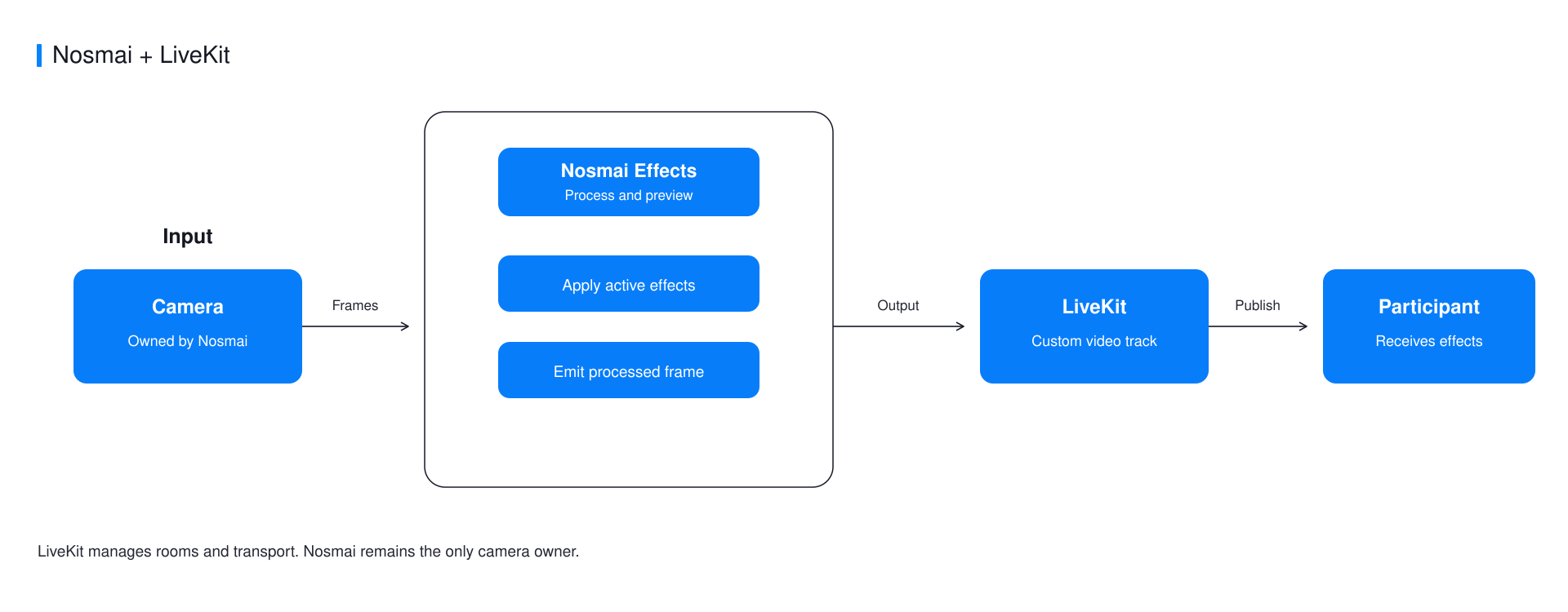
Nosmai owns the camera and preview. The bridge creates a LiveKit video track from the processed native output, while LiveKit manages the room and transport.
Install the packages
dependencies:
  nosmai_effects_sdk: ^1.0.3
  nosmai_livekit_bridge:
    git:
      url: https://github.com/nosmai/nosmai_livekit_bridge.git
  livekit_client: ^2.6.4
The Android host application must still package the verified Nosmai AAR. The iOS host resolves the native SDK through CocoaPods.
Register the shared context first
Call registerShareContext before Nosmai initialization. This order lets the Android encoder read the textures produced by Nosmai. The call is a no-op on iOS.
await NosmaiLiveKitBridge.registerShareContext();

final initialized = await NosmaiFlutter.initialize(nosmaiLicenseKey);
if (!initialized) {
  throw StateError('Nosmai initialization was not accepted');
}
Keep one NosmaiCameraPreview mounted for the full session. Do not create a LiveKit camera track.
const NosmaiCameraPreview()
Publish the processed track
final room = Room(
  roomOptions: const RoomOptions(
    stopLocalTrackOnUnpublish: false,
    defaultVideoPublishOptions: VideoPublishOptions(simulcast: false),
  ),
);

await room.connect(liveKitUrl, liveKitToken);

final track = await NosmaiLiveKitBridge.createVideoTrack();
await room.localParticipant!.publishVideoTrack(track);
Apply and switch effects through NosmaiFlutter. Switch the camera through Nosmai as well, because LiveKit does not own capture on this path.
Stop in the correct order
await NosmaiLiveKitBridge.stopStreaming();
await room.disconnect();
Stop the bridge before disconnecting the room so it can release its native track and graphics resources safely.
Common errors
| Symptom | Cause | Fix |
|---|---|---|
| Local preview works but remote video is black | The shared context was registered after Nosmai initialization | Await registerShareContext before NosmaiFlutter.initialize |
| No frames are published | NosmaiCameraPreview is not mounted | Keep one preview mounted throughout the session |
| Remote video is raw or the camera is busy | LiveKit also created a camera track | Publish only the track returned by createVideoTrack |
| A second session freezes | The first bridge session was not stopped | Pair each successful start with stopStreaming |
Verify it worked
Apply a visible effect and join the room from a second participant. Confirm the remote video is filtered and remains stable after camera switch, stop, and rejoin.
Complete example
Use the maintained Nosmai LiveKit bridge example for the full screen, token configuration, filter picker, and teardown flow.
Next steps
- Compare live-streaming routes
- Review Flutter installation requirements
- Understand off-screen rendering
