

Flutter live streaming with Agora
This page is for Flutter applications using
nosmai_agora_bridge. For native Android or iOS integration, read Native live streaming.
Overview
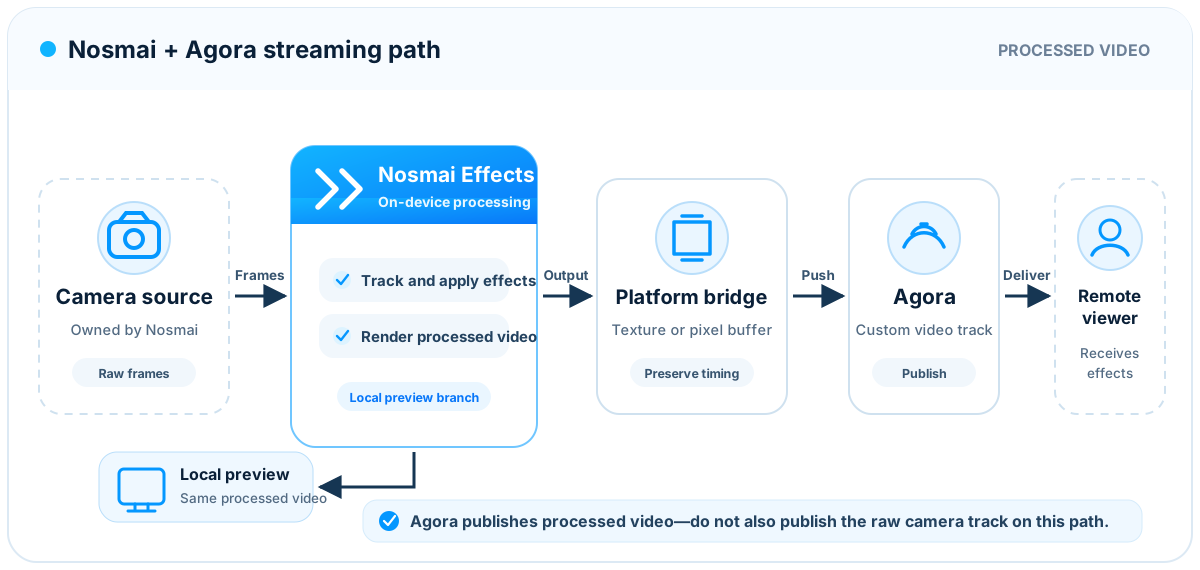
Nosmai does not tap your stream. It becomes the stream. The SDK renders the filtered camera frame on the GPU and hands that frame to Agora as a custom video track, so what viewers see is exactly what the broadcaster sees, effects included.
The frame never round-trips through the CPU. On Android the Agora engine and the Nosmai renderer share an EGL share group, so Nosmai passes a texture ID straight to Agora's encoder. On iOS there is no share group; frames are handed over as CVPixelBuffer/IOSurface instead. The Dart API is identical on both.
camera -> Nosmai render (beauty, makeup, AR, background) -> Agora custom video track -> viewers
The nosmai_agora_bridge package does all the native plumbing. Install it beside your existing agora_rtc_engine and nosmai_camera_sdk.
dependencies:
nosmai_camera_sdk: ^3.0.6
nosmai_agora_bridge:
git:
url: https://github.com/nosmai/nosmai_agora_bridge.git
agora_rtc_engine: ^6.5.3
permission_handler: ^12.0.1
Streaming needs camera and microphone permission. Request both before you initialize the engine, and declare CAMERA + RECORD_AUDIO in AndroidManifest.xml and NSCameraUsageDescription + NSMicrophoneUsageDescription in Info.plist.
Setup order
The ordering rule below is load-bearing. Get it wrong and the local preview looks perfect while every remote viewer sees black.
- Call
getNativeHandlefirst, beforeNosmaiFlutter.initialize. This creates the shared Agora engine and stashes Agora'sEGLContextfor Nosmai to consume. - Then initialize Nosmai. Its GL context is created now and joins the share group.
- Create the Agora engine from that same handle.
- Start the preview, then start streaming.
// 1. Register the share context while NO Nosmai GL context exists yet. await NosmaiAgoraBridge.getNativeHandle(agoraAppId: agoraAppId); // 2. Now build the Nosmai GL context. It picks up the share context above. await NosmaiFlutter.initialize(nosmaiLicenseKey);
[!WARNING] An EGL context can only join a share group at creation time. If
NosmaiFlutter.initializeruns first, the share context arrives too late, is silently ignored, and Agora's encoder cannot sample Nosmai's output texture, which produces black remote video. iOS needs this call too, for a different reason: it constructs the bridge's native controller, without which streaming falls back to Agora's unfiltered raw camera.
Create the engine
Build the engine from the bridge's handle rather than a plain one. getNativeHandle is idempotent and returns the cached handle.
final handle = await NosmaiAgoraBridge.getNativeHandle(agoraAppId: appId); final engine = createAgoraRtcEngine(sharedNativeHandle: handle); await engine.initialize(RtcEngineContext( appId: appId, channelProfile: ChannelProfileType.channelProfileLiveBroadcasting, )); await engine.enableVideo(); await engine.enableAudio(); // Match the encoder to the frames you actually push: 9:16 portrait. await engine.setVideoEncoderConfiguration(const VideoEncoderConfiguration( dimensions: VideoDimensions(width: 720, height: 1280), frameRate: 30, bitrate: 2500, minBitrate: 1200, orientationMode: OrientationMode.orientationModeFixedPortrait, ));
[!NOTE] On iOS the bridge builds its engine with
sharedEngineWithConfig:, a process singleton. Always wrap the bridge's handle instead of creating a second engine, or two Dart wrappers end up driving one native engine with conflicting state.
Start streaming
The bridge sets the external video source, flips Nosmai to dual-output and joins the channel itself with publishCustomVideoTrack: true and publishCameraTrack: false. Do not call joinChannel yourself on this path.
final ok = await NosmaiAgoraBridge.startStreaming( channelName: channelName, token: (token != null && token.isNotEmpty) ? token : null, uid: uid, );
Guard against duplicate starts. If a server event can fire twice, a second startStreaming while the first join is still in flight makes Agora reject it and the cleanup path disarms the stream that was about to succeed.
Filters apply exactly as they do off-stream. Anything you set through NosmaiFlutter.instance is already in the published frames.
Teardown
await NosmaiAgoraBridge.stopStreaming(); // returns Nosmai to preview-only if (!Platform.isIOS) await engine.leaveChannel(); // only when tearing the whole session down await engine.release(); await NosmaiAgoraBridge.disposeNative();
On iOS stopStreaming already leaves the channel on the shared engine, so a second leaveChannel fires a spurious callback that can clear bridge state while a restart races. Android's bridge does not leave on your behalf and still needs it.
Keep disposeNative symmetric with engine.release(). Releasing the engine without clearing the bridge's cached handle leaves a dangling pointer, and the next getNativeHandle returns a dead engine.
Troubleshooting
Black remote video, local preview fine. The share group was never established. Confirm getNativeHandle runs before NosmaiFlutter.initialize, and that the engine was created with sharedNativeHandle: rather than a plain createAgoraRtcEngine().
Second go-live freezes, then goes permanently black. The Agora texture helper must be created and destroyed per stream, not once at init. A helper that survives stopStreaming keeps contending the single Nosmai GL worker, so the next go-live's surface release blocks behind a saturated worker. The bridge tears the helper down inside stopStreaming. Make sure you call it before starting the next stream rather than only leaving the channel.
Remote view is zoomed in or softer than the preview. The encoder is declaring a different aspect than the pushed frames. Nosmai publishes 720x1280 portrait; a 4:3 or adaptive-orientation encoder config makes Agora centre-crop the sides and upscale what is left. Set orientationModeFixedPortrait at 720x1280, and note that a setVideoEncoderConfiguration call after engine init overrides whatever the bridge configured.
Stream falls back to the unfiltered camera. startStreaming returned false, or getNativeHandle failed and the engine was built plain. Check the return value and fall back deliberately rather than silently.
Camera switch loses filters on iOS. Call NosmaiAgoraBridge.notifyCameraSwitch() after switching. Android detects the switch itself and the call is a no-op there.