



Prerequisites
- Configure Agora broadcaster authentication, audio, and channel lifecycle.
- Disable Agora's camera track because Nosmai owns the camera.
- Pin and test the provider version used by your application.
The streaming path
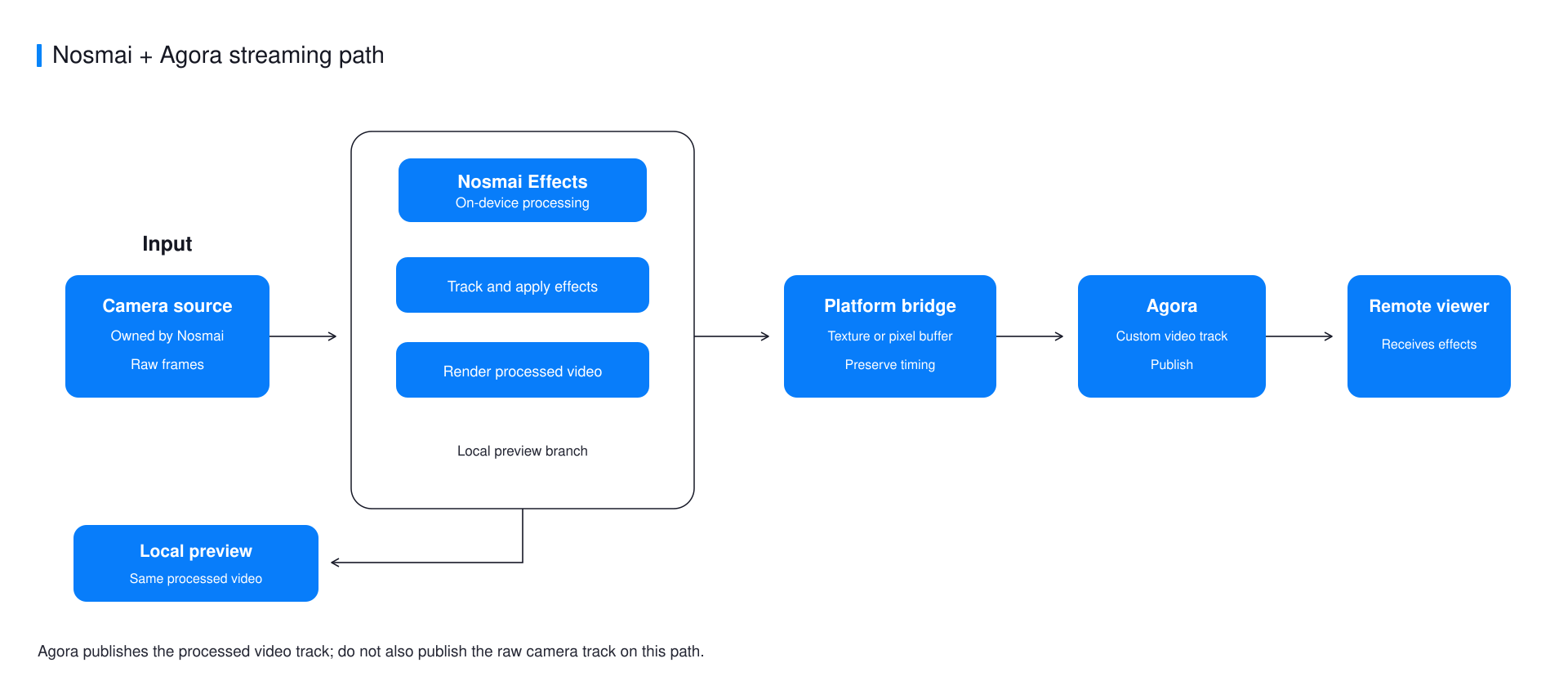
Nosmai owns and processes the camera feed. Agora publishes only the processed output while the application keeps its local preview and session controls.
Register Agora's EGL context first
Create the Agora engine, get its shared EGL context, and register its native handle before Nosmai initialization:
long agoraContext = EglBaseProvider.instance()
    .getRootEglBase()
    .getEglBaseContext()
    .getNativeEglContext();

NosmaiSDK.setAgoraShareContext(agoraContext);
This order is required. A context registered after Nosmai initialization cannot join the existing share group and can produce a correct local preview with black remote video.
Publish processed textures
NosmaiSDK.setRenderMode(NosmaiSDK.RenderMode.DUAL_OUTPUT);

NosmaiSDK.setTextureFrameCallback((textureId, width, height,
                                   timestampNs, fence) -> {
    agoraAdapter.pushTexture(
        textureId, width, height, timestampNs, fence,
        () -> NosmaiSDK.releaseStreamSlot(textureId)
    );
});
The adapter must wait for the EGL fence before sampling. Release every stream slot after Agora finishes with it, including dropped-frame and error paths.
Stop in the correct order
- Stop Agora publishing so it cannot request another frame.
- Clear the Nosmai texture callback.
- Return Nosmai to
PREVIEW_ONLY. - Leave the channel and release Agora when the session ends.
NosmaiSDK.setTextureFrameCallback(null);
NosmaiSDK.setRenderMode(NosmaiSDK.RenderMode.PREVIEW_ONLY);
Common errors
| Symptom | Cause | Fix |
|---|---|---|
| Local preview works but remote video is black | The EGL share context was registered too late | Create Agora and call setAgoraShareContext before Nosmai initialization |
| Stream stalls after several frames | Texture slots are not returned | Call releaseStreamSlot on success, drop, and error paths |
| Remote video is cropped | Encoder dimensions or orientation do not match the pushed frames | Keep the provider configuration aligned with actual output |
Verify it worked
Apply a visible effect, join from a second device, and confirm the remote video is filtered, correctly oriented, and stable through camera switch and rejoin.
Next steps
- Compare live-streaming routes
- Understand off-screen rendering
- Review Android installation requirements
