

Nosmai / docs
Nosmai Effects Nosmai Moderation Nosmai Try-ons coming soon
Docs menu Live streaming with Agora
docs / nosmai effects / guide / live streaming with agora

Live streaming with Agora

Publish the Nosmai processed camera preview through Agora in Flutter while keeping the existing channel, token, event, and remote-video code familiar.

Overview

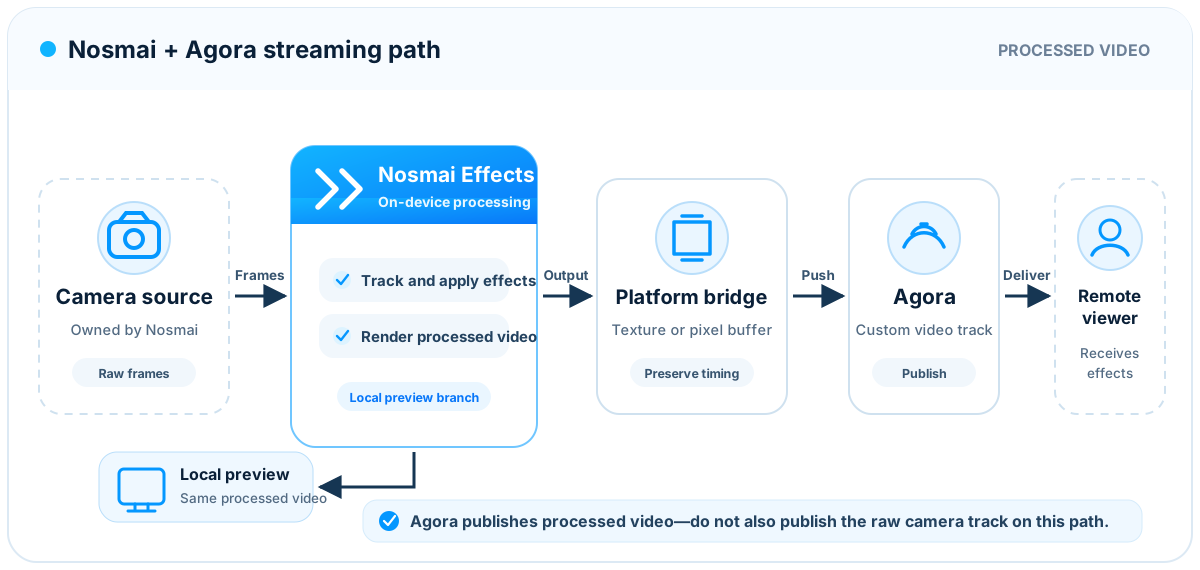
Nosmai can apply filters, beauty, makeup, face shaping, and background effects before a camera frame is published to an Agora channel.

The stream flow is:

Camera
    |
    v
Nosmai effects
    |
    v
Processed preview
    |
    v
Agora channel
    |
    v
Remote viewers

The Nosmai Agora bridge connects the Nosmai camera output to an Agora engine. Your application still owns:

  • the Agora App ID
  • channel names
  • channel tokens
  • broadcaster and audience roles
  • Agora event handling
  • remote-user views
  • application navigation and session state

Nosmai owns the local camera preview while the bridge integration is active. The bridge publishes that processed output through Agora.

The official repositories are:

Create Nosmai projects and license keys in the Nosmai Console.

What changes in an existing Agora app

An application that already uses Agora keeps most of its existing code.

Keep:

  • RtcEngineContext
  • the App ID
  • the channel name
  • the token service
  • RtcEngineEventHandler
  • remote-user tracking
  • AgoraVideoView for remote users
  • mute, role, connection, and channel controls

Change:

  1. Add the Nosmai Flutter SDK and Nosmai Agora bridge.
  2. Ask the bridge for the shared native handle before initializing Nosmai.
  3. Create the Dart Agora engine with that handle.
  4. Show NosmaiCameraPreview as the local preview.
  5. Start the channel through NosmaiAgoraBridge.startStreaming after the local preview reports that it is ready.
  6. Stop the stream and release resources in the documented order.

The bridge flow must not create a second local camera capture. Therefore:

  • do not use AgoraVideoView for the local preview
  • do not call RtcEngine.startPreview
  • do not call RtcEngine.joinChannel directly
  • do not call RtcEngine.switchCamera for the local camera

The bridge joins and leaves the channel because it must configure Agora to publish the processed Nosmai output.

Requirements

RequirementTested value or minimum
Flutter3.22.0 or later
Dart3.0.0 or later
AndroidAPI 21 or later, arm64-v8a physical device
Nosmai Flutter SDK3.0.6 or a compatible later release
Agora Flutter engine6.5.3 for the currently validated integration
Nosmai Agora bridgev2 branch
PermissionsCamera, microphone, and internet

Use a physical device. An emulator is not a reliable environment for camera effects, shared graphics resources, encoding, or sustained streaming tests.

Agora and the bridge must resolve to compatible native Agora versions. Do not force a second incompatible Agora native dependency into the application.

Install

Add the packages to the Flutter application:

dependencies:
  flutter:
    sdk: flutter

  agora_rtc_engine: ^6.5.3
  nosmai_camera_sdk: ^3.0.6

  nosmai_agora_bridge:
    git:
      url: https://github.com/nosmai/nosmai_agora_bridge.git
      ref: v2

Run:

flutter pub get

During local bridge development, a relative path can replace the Git dependency:

dependencies:
  nosmai_agora_bridge:
    path: ../nosmai_agora_bridge

Do not publish a package or application with an absolute path from a developer computer.

Configure Android

Minimum version

Confirm that the application uses API 21 or later:

android {
    defaultConfig {
        minSdk = 21
    }
}

Permissions

Add the required permissions:

<manifest xmlns:android="http://schemas.android.com/apk/res/android">
    <uses-permission android:name="android.permission.CAMERA" />
    <uses-permission android:name="android.permission.RECORD_AUDIO" />
    <uses-permission android:name="android.permission.INTERNET" />

    <application
        android:label="Live App"
        android:name="${applicationName}"
        android:icon="@mipmap/ic_launcher">
        ...
    </application>
</manifest>

Request camera and microphone access before creating the bridge or camera preview.

Protect Agora credentials

An Agora App ID identifies the Agora project. A channel token authorizes a user to join a channel.

For production:

  • generate tokens on a trusted server
  • send short-lived tokens to authenticated application users
  • do not embed an App Certificate in the mobile application
  • renew a token before it expires
  • keep channel authorization separate from Nosmai licensing

Nosmai does not create Agora channels or tokens. The bridge only publishes the processed camera output to the channel details supplied by the application.

For a test project with App Certificate security disabled, token may be null. Do not use that configuration as the production security model.

Required initialization order

The initialization order is important on Android.

Request permissions
    |
    v
Close any previous Nosmai camera view
    |
    v
Get the shared handle from NosmaiAgoraBridge
    |
    v
Create and initialize the Agora Dart engine
    |
    v
Initialize Nosmai
    |
    v
Configure the Nosmai camera
    |
    v
Show NosmaiCameraPreview
    |
    v
Wait for onInitialized
    |
    v
Call NosmaiAgoraBridge.startStreaming

The bridge must create the shared graphics context before Nosmai creates its camera rendering resources. Reversing this order can produce a white preview, a black remote stream, or a slower fallback.

When Nosmai was already initialized

If the application opened a normal Nosmai camera screen before the streaming screen:

  1. remove the previous NosmaiCameraPreview
  2. wait for that screen to finish closing
  3. call NosmaiFlutter.instance.cleanup()
  4. initialize the bridge
  5. initialize Nosmai again for the streaming screen

Do not call cleanup() while an old preview widget is still visible. Its native view should be removed first.

Create the shared Agora engine

Request the bridge handle before initializing Nosmai:

import 'package:agora_rtc_engine/agora_rtc_engine.dart';
import 'package:nosmai_agora_bridge/nosmai_agora_bridge.dart';

Future<RtcEngine> createStreamingEngine(String agoraAppId) async {
  final nativeHandle = await NosmaiAgoraBridge.getNativeHandle(
    agoraAppId: agoraAppId,
  );

  if (nativeHandle == 0) {
    throw StateError('Nosmai Agora bridge initialization failed');
  }

  final engine = createAgoraRtcEngine(
    sharedNativeHandle: nativeHandle,
  );

  await engine.initialize(
    RtcEngineContext(
      appId: agoraAppId,
      channelProfile:
          ChannelProfileType.channelProfileLiveBroadcasting,
    ),
  );

  await engine.enableVideo();
  return engine;
}

Do not create another Agora engine before calling getNativeHandle. The bridge and Dart must refer to the same native engine.

Register Agora events

Existing Agora event code remains valid:

final remoteUids = <int>{};
bool joined = false;

engine.registerEventHandler(
  RtcEngineEventHandler(
    onJoinChannelSuccess: (connection, elapsed) {
      joined = true;
    },
    onUserJoined: (connection, remoteUid, elapsed) {
      remoteUids.add(remoteUid);
    },
    onUserOffline: (connection, remoteUid, reason) {
      remoteUids.remove(remoteUid);
    },
    onError: (error, message) {
      // Record the Agora error and show a stable application message.
    },
  ),
);

startStreaming() returning true means the native join request was accepted. The stream is connected only after Agora reports onJoinChannelSuccess.

Initialize Nosmai

After the shared Agora engine is ready, initialize Nosmai:

import 'package:nosmai_camera_sdk/nosmai_camera_sdk.dart';

final initialized = await NosmaiFlutter.initialize(
  'NOSMAI-YOUR-LICENSE-KEY',
);

if (!initialized) {
  throw StateError('Nosmai initialization failed');
}

await NosmaiFlutter.instance.configureCamera(
  position: NosmaiCameraPosition.front,
);

Do not initialize Nosmai in a widget build method.

Show the local preview

Use NosmaiCameraPreview for the local broadcaster:

bool previewReady = false;

NosmaiCameraPreview(
  onInitialized: () async {
    previewReady = true;
    await startStreamIfReady();
  },
  onError: (message) {
    // Display or record the preview error.
  },
)

Do not show a local AgoraVideoView at the same time. Remote participants still use AgoraVideoView.

Start the stream

Start once, after both the Agora engine and Nosmai preview are ready:

bool agoraReady = false;
bool previewReady = false;
bool startInProgress = false;
bool streamStarted = false;

Future<void> startStreamIfReady() async {
  if (!agoraReady ||
      !previewReady ||
      startInProgress ||
      streamStarted) {
    return;
  }

  startInProgress = true;

  try {
    final accepted = await NosmaiAgoraBridge.startStreaming(
      channelName: channelName,
      token: token.isEmpty ? null : token,
      uid: 0,
    );

    if (!accepted) {
      throw StateError('Agora did not accept the join request');
    }

    streamStarted = true;
  } finally {
    startInProgress = false;
  }
}

The readiness checks prevent duplicate join requests when widgets rebuild or camera-ready callbacks repeat.

The bridge configures the Android stream as a broadcaster and publishes the processed custom video output. Do not call engine.joinChannel() again.

Display remote users

Remote views continue to use the Agora engine:

Widget remoteVideo({
  required RtcEngine engine,
  required String channelName,
  required int remoteUid,
}) {
  return AgoraVideoView(
    controller: VideoViewController.remote(
      rtcEngine: engine,
      canvas: VideoCanvas(uid: remoteUid),
      connection: RtcConnection(channelId: channelName),
    ),
  );
}

The local preview comes from Nosmai. The remote preview comes from Agora.

Apply effects during a stream

The same Nosmai methods used by a camera screen work during streaming.

Apply a .nosmai package

Use the unified applyEffect method:

final applied = await NosmaiFlutter.instance.applyEffect(
  selectedFilter.path,
);

if (!applied) {
  // Keep the previous selected state and report the failure.
}

applyEffect supports packages whose declared type is:

  • filter
  • effect
  • beauty_effect
  • background

The package type is read from the .nosmai package. The application should not guess it from the filename.

Get local filters

final groups =
    await NosmaiFlutter.instance.getAllLocalFilters();

final colorFilters = groups['filter'] ?? const [];
final effects = groups['effect'] ?? const [];
final beautyEffects = groups['beauty_effect'] ?? const [];
final backgrounds = groups['background'] ?? const [];

Apply built-in beauty

await NosmaiFlutter.instance.applySkinSmoothing(0.35);
await NosmaiFlutter.instance.setFaceSlimLevel(0.15);

Use restrained default values. Let the user change intensity with sliders instead of repeatedly applying and removing the same feature.

Clear effects

await NosmaiFlutter.instance.clearAll();

clearAll() removes regular filters, AR effects, beauty effects, and background processing. Use removeAllMakeup() separately when built-in makeup must also be reset explicitly.

Switch the camera

In the documented bridge flow, Nosmai owns the camera:

final switched = await NosmaiFlutter.instance.switchCamera();

Do not call engine.switchCamera() on this screen. That would ask Agora to switch a camera capture that is not the owner of the local preview.

Prevent repeated taps until the previous switch completes. The Flutter SDK also contains a short internal switch throttle.

NosmaiAgoraBridge.notifyCameraSwitch() is available for compatibility with integrations where Agora owns the camera capture.

Stop and release

Cleanup order is important:

Stop bridge streaming
    |
    v
Stop Nosmai processing
    |
    v
Remove NosmaiCameraPreview
    |
    v
Release the Dart Agora engine
    |
    v
Dispose the native bridge

Use one guarded shutdown method:

Future<void>? shutdownFuture;
RtcEngine? engine;
bool showPreview = true;

Future<void> shutdown() {
  return shutdownFuture ??= performShutdown();
}

Future<void> performShutdown() async {
  try {
    await NosmaiAgoraBridge.stopStreaming();
  } catch (_) {
    // Continue releasing the remaining resources.
  }

  final nosmai = NosmaiFlutter.instance;
  if (nosmai.isInitialized && nosmai.isProcessing) {
    try {
      await nosmai.stopProcessing();
    } catch (_) {
      // Continue cleanup.
    }
  }

  if (mounted && showPreview) {
    setState(() => showPreview = false);
    await WidgetsBinding.instance.endOfFrame;
  }

  try {
    await engine?.release();
  } catch (_) {
    // Continue cleanup.
  }
  engine = null;

  try {
    await NosmaiAgoraBridge.disposeNative();
  } catch (_) {
    // Cleanup is already ending.
  }
}

NosmaiAgoraBridge.stopStreaming() leaves the bridge-owned Agora channel. Do not call engine.leaveChannel() a second time in this flow.

A Flutter dispose() method cannot await asynchronous cleanup. Intercept the back action, await shutdown(), and then close the route:

Future<void> closeScreen() async {
  await shutdown();
  if (mounted) {
    Navigator.of(context).pop();
  }
}

Keep an unawaited shutdown call in dispose() only as a final safety measure for parent-route or application teardown.

Minimal screen structure

The following structure shows the ownership boundaries without application styling:

class LiveStreamScreen extends StatefulWidget {
  const LiveStreamScreen({super.key});

  @override
  State<LiveStreamScreen> createState() => _LiveStreamScreenState();
}

class _LiveStreamScreenState extends State<LiveStreamScreen> {
  RtcEngine? _engine;
  final remoteUids = <int>{};

  bool showPreview = false;
  bool agoraReady = false;
  bool previewReady = false;
  bool startInProgress = false;
  bool streamStarted = false;
  bool joined = false;
  bool closing = false;
  Future<void>? shutdownFuture;
  String? errorMessage;

  @override
  void initState() {
    super.initState();
    initializeStream();
  }

  Future<void> initializeStream() async {
    try {
      if (NosmaiFlutter.instance.isInitialized) {
        await NosmaiFlutter.instance.cleanup();
      }

      final nativeHandle =
          await NosmaiAgoraBridge.getNativeHandle(
        agoraAppId: agoraAppId,
      );

      final engine = createAgoraRtcEngine(
        sharedNativeHandle: nativeHandle,
      );
      _engine = engine;

      await engine.initialize(
        RtcEngineContext(
          appId: agoraAppId,
          channelProfile:
              ChannelProfileType.channelProfileLiveBroadcasting,
        ),
      );

      engine.registerEventHandler(
        RtcEngineEventHandler(
          onJoinChannelSuccess: (connection, elapsed) {
            if (mounted) setState(() => joined = true);
          },
          onUserJoined: (connection, uid, elapsed) {
            if (mounted) setState(() => remoteUids.add(uid));
          },
          onUserOffline: (connection, uid, reason) {
            if (mounted) setState(() => remoteUids.remove(uid));
          },
          onError: (error, message) {
            if (mounted) {
              setState(() {
                errorMessage =
                    'The live stream could not continue.';
              });
            }
          },
        ),
      );

      await engine.enableVideo();

      final initialized = await NosmaiFlutter.initialize(
        nosmaiLicenseKey,
      );
      if (!initialized) {
        throw StateError('Nosmai initialization failed');
      }

      await NosmaiFlutter.instance.configureCamera(
        position: NosmaiCameraPosition.front,
      );

      if (!mounted || closing) return;
      setState(() {
        agoraReady = true;
        showPreview = true;
      });
    } catch (error) {
      if (!mounted) return;
      setState(() {
        errorMessage = 'The live camera could not start.';
      });
    }
  }

  Future<void> startStreamIfReady() async {
    if (closing ||
        !agoraReady ||
        !previewReady ||
        startInProgress ||
        streamStarted) {
      return;
    }

    startInProgress = true;
    try {
      final accepted =
          await NosmaiAgoraBridge.startStreaming(
        channelName: channelName,
        token: token,
        uid: 0,
      );

      if (!mounted) return;
      setState(() {
        streamStarted = accepted;
        errorMessage =
            accepted ? null : 'The channel could not start.';
      });
    } finally {
      startInProgress = false;
    }
  }

  Future<void> closeScreen() async {
    if (closing) return;
    closing = true;
    await shutdown();
    if (mounted) Navigator.of(context).pop();
  }

  Future<void> shutdown() {
    return shutdownFuture ??= performShutdown();
  }

  Future<void> performShutdown() async {
    try {
      await NosmaiAgoraBridge.stopStreaming();
    } catch (_) {}

    try {
      final nosmai = NosmaiFlutter.instance;
      if (nosmai.isInitialized && nosmai.isProcessing) {
        await nosmai.stopProcessing();
      }
    } catch (_) {}

    if (mounted && showPreview) {
      setState(() => showPreview = false);
      await WidgetsBinding.instance.endOfFrame;
    }

    try {
      await _engine?.release();
    } catch (_) {}
    _engine = null;

    try {
      await NosmaiAgoraBridge.disposeNative();
    } catch (_) {}
  }

  @override
  void dispose() {
    closing = true;
    shutdown();
    super.dispose();
  }

  @override
  Widget build(BuildContext context) {
    return PopScope(
      canPop: false,
      onPopInvokedWithResult: (didPop, result) {
        if (!didPop) closeScreen();
      },
      child: Scaffold(
        backgroundColor: Colors.black,
        body: Stack(
          fit: StackFit.expand,
          children: [
            if (showPreview)
              NosmaiCameraPreview(
                onInitialized: () async {
                  previewReady = true;
                  await startStreamIfReady();
                },
                onError: (message) {
                  if (mounted) {
                    setState(() => errorMessage = message);
                  }
                },
              ),
            if (remoteUids.isNotEmpty && _engine != null)
              Positioned(
                top: 48,
                right: 16,
                width: 120,
                height: 180,
                child: remoteVideo(
                  engine: _engine!,
                  channelName: channelName,
                  remoteUid: remoteUids.first,
                ),
              ),
            if (errorMessage != null)
              Center(child: Text(errorMessage!)),
          ],
        ),
      ),
    );
  }
}

The application must request camera and microphone permissions before initializeStream(). Production code should also expose loading, reconnecting, token renewal, and audience-role states.

API reference

Nosmai Agora bridge

MethodPurposeResult
getNativeHandle(agoraAppId:)Create the native bridge owner and return the shared Agora handleFuture<int>
startStreaming(channelName:, token:, uid:)Join the channel and publish Nosmai processed videoFuture<bool>
stopStreaming()Stop publishing and leave the bridge-owned channelFuture<bool>
notifyCameraSwitch()Notify the bridge after an Agora-owned camera switchFuture<void>
disposeNative()Release native bridge and Agora resourcesFuture<void>
isInitializedReport whether a native bridge handle is storedbool

isInitialized only describes bridge-handle state. It does not mean the user has joined an Agora channel.

MethodPurpose
NosmaiFlutter.initialize(licenseKey)Initialize Nosmai
configureCamera(position:)Select the initial camera
NosmaiCameraPreviewDisplay the processed local camera
applyEffect(path)Apply any supported .nosmai package
getAllLocalFilters()List local packages by their declared type
switchCamera()Switch the Nosmai-owned camera
clearAll()Remove active visual changes
stopProcessing()Stop camera processing before screen removal

Troubleshooting

White local screen

Check:

  1. getNativeHandle() ran before NosmaiFlutter.initialize().
  2. Only one native Agora engine exists.
  3. NosmaiCameraPreview is used for the local preview.
  4. An old camera screen finished closing before the streaming screen opened.
  5. Camera permission was granted.

Local preview works but remote video is black

Check:

  1. startStreaming() was called after NosmaiCameraPreview.onInitialized.
  2. The application did not call engine.joinChannel() directly.
  3. The broadcaster token is valid for the channel and UID.
  4. onJoinChannelSuccess was received.
  5. The remote client subscribed to video.
  6. The application did not immediately stop processing after joining.

Filters appear locally but not remotely

Check:

  1. The stream was started through the bridge.
  2. The selected package completed applyEffect() successfully.
  3. The remote client is showing the current broadcaster UID.
  4. The filter was not cleared by another screen or state controller.

The second visit shows a frozen or black camera

The previous session probably did not release one of its owners.

Confirm this order:

  1. stopStreaming()
  2. stopProcessing()
  3. remove NosmaiCameraPreview
  4. engine.release()
  5. disposeNative()

Guard cleanup so navigation and dispose() cannot release the same session at the same time.

Joining happens twice

Keep startInProgress and streamStarted flags. A widget rebuild or repeated camera-ready callback must not issue a second startStreaming() call.

Camera switch does not update the stream

On the documented bridge flow, call:

await NosmaiFlutter.instance.switchCamera();

Do not call engine.switchCamera().

Performance is lower on one device

Test in this order:

  1. preview with no active effect
  2. preview with one color filter
  3. preview with face beauty
  4. live stream with no active effect
  5. live stream with the required effect
  6. a long stream while monitoring heat and battery

For stable performance:

  • target 30 FPS
  • keep one local preview active
  • avoid applying the same filter every frame
  • wait for one filter change before applying another
  • avoid unnecessary background processing
  • use reasonably sized effect textures
  • test the lowest supported device
  • test in release mode

The current Android bridge prefers direct GPU texture sharing. If that setup is not available, it can use a slower pixel-copy fallback. A fallback may keep the stream functional but use more CPU and memory bandwidth.

Android logs report a slower fallback

Review device logs for the bridge setup result. If the direct texture path is not available:

  • confirm the bridge was initialized before Nosmai
  • confirm compatible Agora native libraries were resolved
  • confirm only one Agora engine exists
  • reproduce on another physical device
  • include the device model, Android version, ABI, and package versions in the support report

Production checklist

Before release:

  • use a production Nosmai license for the final Android package name
  • obtain Agora tokens from a trusted server
  • handle token renewal
  • handle onError, disconnect, reconnect, and remote-user events
  • request permissions before opening the screen
  • prevent duplicate start and stop operations
  • test front and back cameras
  • test local and remote orientation
  • test local preview mirroring separately from remote output
  • test filter switching during a stream
  • test face loss and reacquisition
  • test background and foreground transitions
  • test leaving and reopening the streaming screen
  • test a long session on the lowest supported device
  • test release builds with code shrinking enabled
  • remove development credentials and verbose logs

Future integration contract

Future native Android, native iOS, Nosmai Agora, and Flutter guides should keep the same user-facing behavior:

  1. Nosmai receives a valid license.
  2. The streaming provider receives its own App ID, channel, token, and role.
  3. The local preview visibly becomes ready before publishing starts.
  4. Effects applied to the local Nosmai preview also appear in the published video.
  5. Channel events remain owned by the application.
  6. Camera switching has one clear owner.
  7. Stop and cleanup methods are safe to call once during normal navigation.
  8. Android and iOS expose matching public names and results.
  9. Internal texture, frame-copy, and native-context details remain hidden from application developers.

This contract keeps the integration small even when the native implementation changes in a later release.

Nosmai

We make advanced camera and AI technology accessible to every developer. By packaging hard problems into simple

developers
legal
newsletter

Product updates and release notes. No spam.

© 2026 nosmai, inc · all rights reserved