



Feature access
Runtime face stickers use the native AR overlay slot. Authored masks and 3D content also require AR Effects and Cloud Filters to be enabled for the project in Nosmai Console.
Prerequisites
- A working React Native quickstart
- A local sticker asset resolved to an absolute
file://URI - AR Effects and Cloud Filters enabled for authored overlays
What a face sticker is
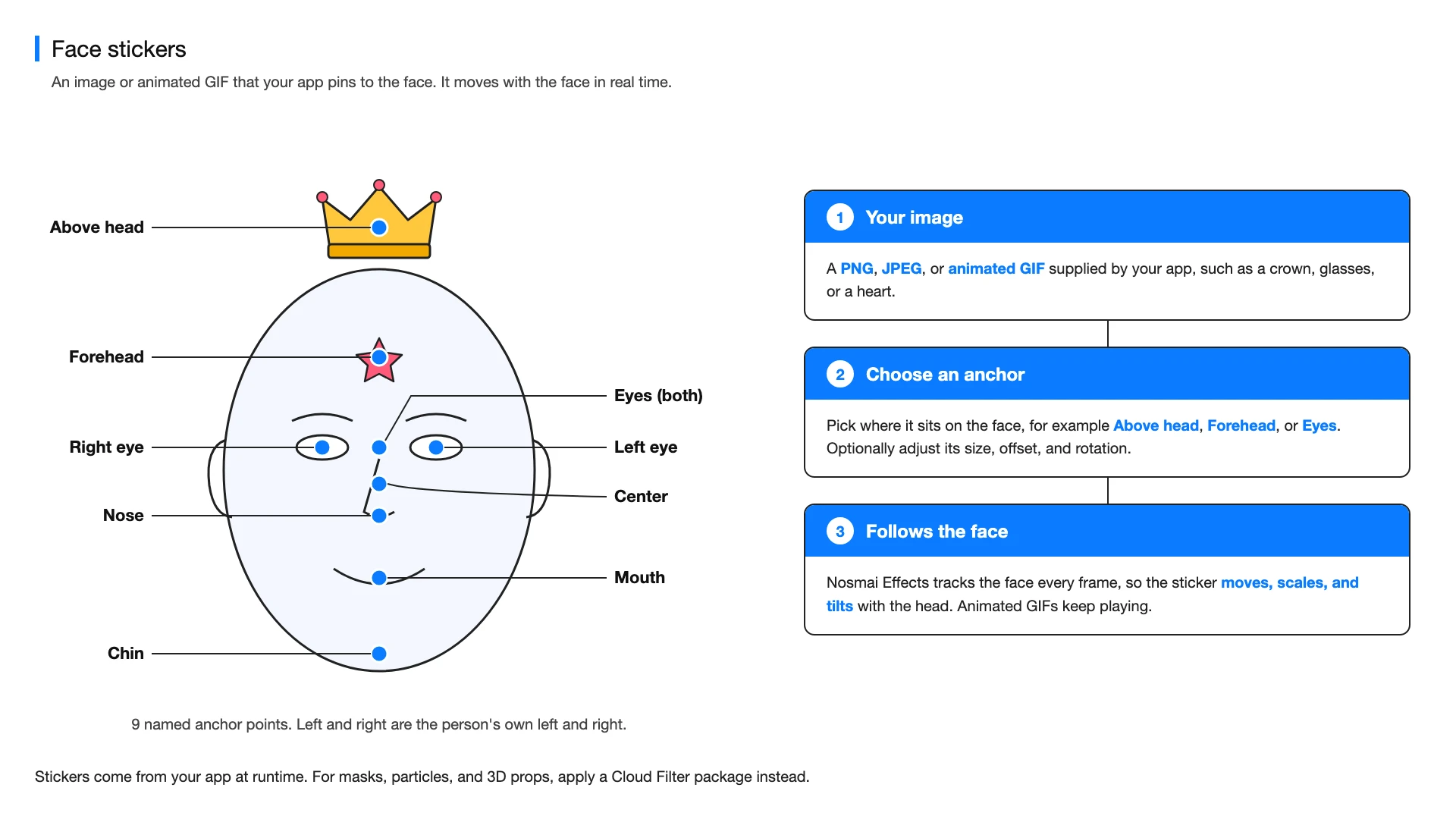
A face sticker is a PNG, JPEG, or animated GIF that your app pins to one of nine points on the face. Nosmai Effects tracks the face every frame, so the sticker moves, scales, and tilts with the head.
Choose the content type
| Type | Use it for | Source |
|---|---|---|
| Runtime face sticker | A local PNG, JPEG, or animated GIF supplied by the application | An absolute local file:// URI |
| Authored AR overlay | Face masks, particles, animated props, and 3D content | A compatible Cloud Filter package |
Add a runtime face sticker
Resolve the packaged asset to an absolute local file URI before calling the SDK. Remote HTTP URLs are not accepted by this API.
const applied = await NosmaiCameraSdk.setFaceSticker({
  uri: localStickerUri,
  anchor: 'forehead',
  scale: 0.45,
  opacity: 1,
});

if (!applied) {
  throw new Error('Face sticker could not be applied');
}
Supported anchors are center, forehead, aboveHead, leftEye, rightEye, eyes, nose, mouth, and chin.
Adjust placement
await NosmaiCameraSdk.setFaceStickerPlacement({
  anchor: 'nose',
  offsetX: 0,
  offsetY: 0.05,
  scale: 0.4,
  rotationDeg: 0,
  opacity: 1,
});
Offsets and scale are relative to the tracked face. Keep opacity between 0 and 1, and keep the same anchor when updating a sticker's placement.
Remove the sticker
if (await NosmaiCameraSdk.isFaceStickerActive()) {
  await NosmaiCameraSdk.clearFaceSticker();
}
Apply an authored or 3D overlay
const page = await NosmaiCameraSdk.getCloudFilters({
  packageType: 'effect',
  page: 1,
  limit: 20,
});
const overlay = page.filters[0];

if (overlay) {
  const download = await NosmaiCameraSdk.downloadCloudFilter(overlay);
  await NosmaiCameraSdk.applyEffect(download.path);
}
Runtime face stickers and authored AR effects share the AR overlay slot. The most recently applied item replaces the previous item in that slot.
Verify
Test face loss and return, head rotation, different face distances, navigation, Fast Refresh cleanup, and both native platforms.
Common errors
| Symptom | Fix |
|---|---|
| Sticker URI is rejected | Resolve the asset to an absolute local file:// URI before calling the SDK |
| Sticker jumps after an update | Pass the same anchor used when the sticker was first applied |
| Duplicate state updates appear | Remove event subscriptions when the camera screen unmounts |
Next steps
- Add an AR face mask in React Native
- Download a Cloud Filter in React Native
- Read the React Native API reference
