



Feature access
Runtime face stickers use the mobile AR overlay slot. Authored masks and 3D content also require AR Effects and Cloud Filters to be enabled for the project in Nosmai Console.
Prerequisites
- A working Android quickstart
- A compatible camera preview; runtime stickers require the supported SDK preview path
- AR Effects and Cloud Filters enabled for authored overlays
What a face sticker is
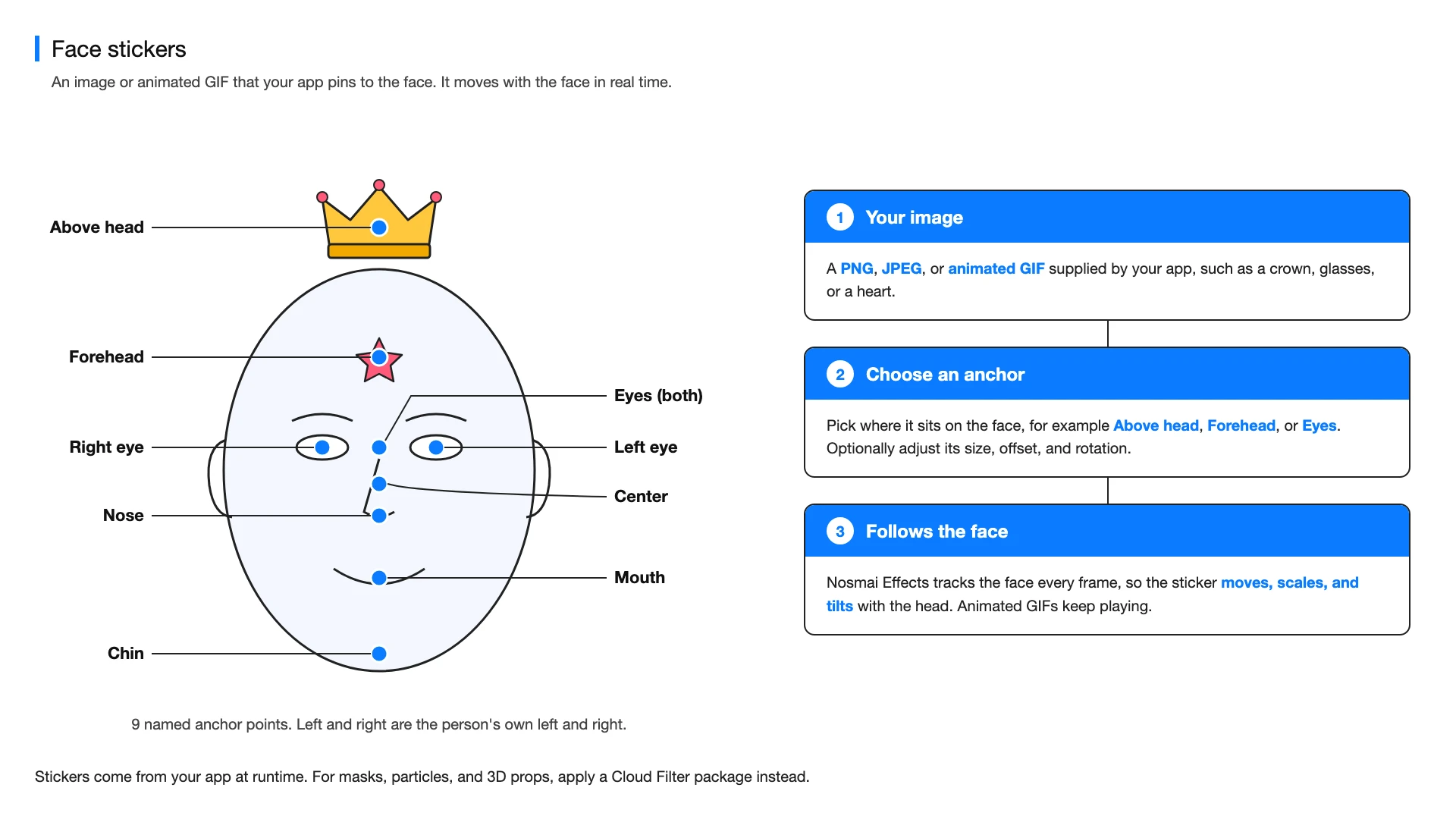
A face sticker is a PNG, JPEG, or animated GIF that your app pins to one of nine points on the face. Nosmai Effects tracks the face every frame, so the sticker moves, scales, and tilts with the head.
Choose the content type
| Type | Use it for | Source |
|---|---|---|
| Runtime face sticker | A PNG, JPEG, or animated GIF supplied by the application | Bitmap or encoded image bytes |
| Authored AR overlay | Face masks, particles, animated props, and 3D content | A compatible Cloud Filter package |
Add a runtime face sticker
Use a named anchor so the sticker follows the intended face landmark.
Bitmap sticker = BitmapFactory.decodeResource(
    getResources(), R.drawable.heart_sticker);

boolean applied = NosmaiSDK.setFaceSticker(
    sticker,
    NosmaiEffects.FaceStickerAnchor.FOREHEAD);

if (!applied) {
    Log.e("Camera", "Face sticker could not be applied");
}
A Bitmap contains only a still image. For an animated GIF, pass the original encoded file bytes so the SDK can preserve its frames and timing.
byte[] gifBytes = readAssetBytes("stickers/sparkles.gif");
boolean applied = NosmaiSDK.setFaceSticker(
    gifBytes,
    NosmaiEffects.FaceStickerAnchor.ABOVE_HEAD);
Available anchors include the face centre, forehead, above the head, either eye, both eyes, nose, mouth, and chin.
Adjust placement
NosmaiSDK.setFaceStickerPlacement(
    NosmaiEffects.FaceStickerAnchor.NOSE,
    0.0f,  // horizontal offset in face-width units
    0.05f, // vertical offset in face-height units
    0.4f,  // sticker width relative to face width
    0.0f,  // clockwise rotation in degrees
    1.0f   // opacity
);
Keep opacity between 0.0f and 1.0f. Pass a non-positive scale while applying the sticker to use the selected anchor's default size.
Remove the sticker
if (NosmaiSDK.isFaceStickerActive()) {
    NosmaiSDK.clearFaceSticker();
}
Apply an authored or 3D overlay
Select an approved effect package from Cloud Filters, download it, and apply the returned local package path.
NosmaiEffects.applyEffect(packagePath, new NosmaiEffects.EffectCallback() {
    @Override public void onSuccess() {
        // The authored overlay is active.
    }

    @Override public void onError(String message) {
        Log.e("Camera", message);
    }
});
The package contains its own tracking configuration, visual assets, animation, triggers, particles, and 3D content. Runtime face stickers and authored AR effects share the AR overlay slot, so the last applied item replaces the previous item.
Runtime face stickers are not available through Android's external frame pipeline. Use the supported SDK preview path, or use a compatible authored effect package for a custom frame integration.
Verify
Test face loss and return, fast head movement, different face distances, both cameras, rotation, and repeated preview start and stop.
Common errors
| Symptom | Fix |
|---|---|
| Animated GIF is static | Pass the original GIF bytes instead of decoding the file into a Bitmap |
| Sticker does not appear in an external-frame session | Runtime stickers require the supported preview path; use an authored package where applicable |
| Sticker disappears after applying a mask | Both use the AR overlay slot; apply the item that should remain visible last |
