



Prerequisites
- The verified Nosmai 3.0.4 AAR
- Android API 24 or later on a physical
arm64-v8adevice - A LiveKit server URL and participant token
- A working Nosmai camera preview
Streaming path
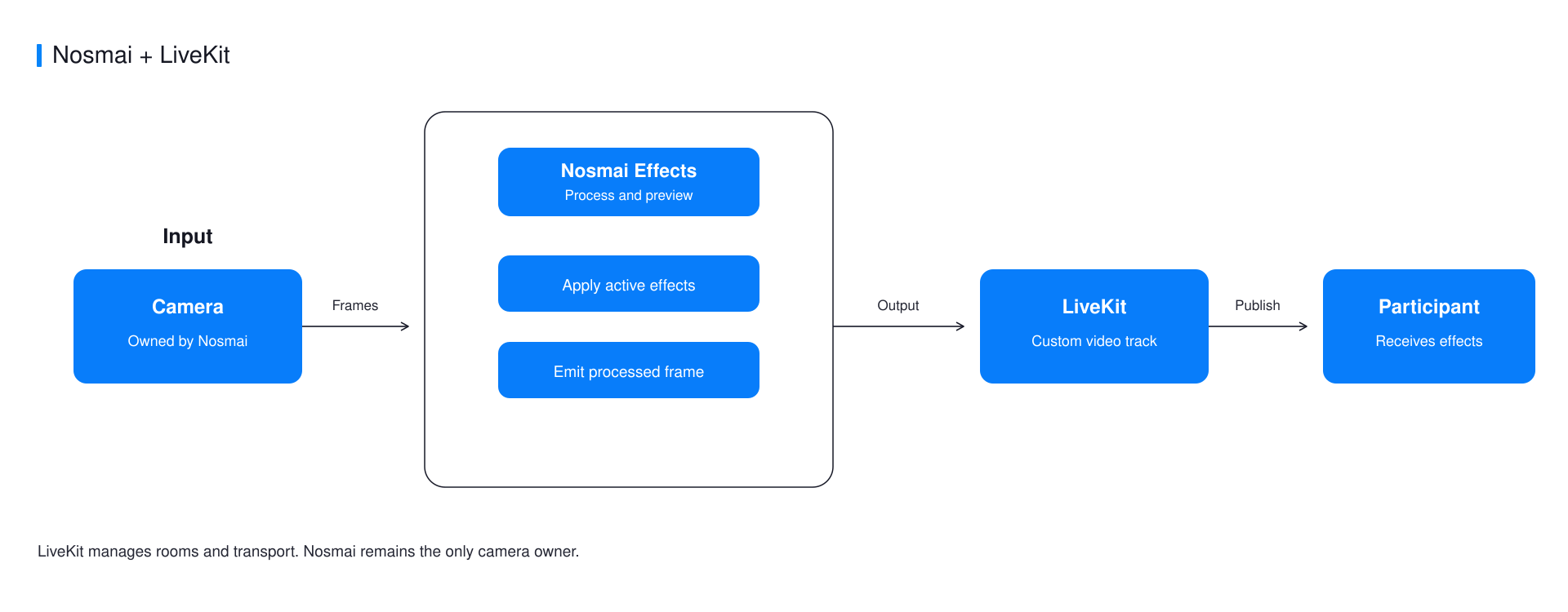
Nosmai owns capture and the local preview. LiveKit receives processed textures through a custom VideoCapturer and publishes them as an ordinary video track.
Add LiveKit
dependencies {
    implementation(files("libs/nosmai-sdk-3.0.4.aar"))
    implementation("io.livekit:livekit-android:2.9.0")
}
Share one EGL context
Create one EglBase and give it to Nosmai before initialization. Give the same instance to LiveKit.
private val eglBase by lazy { EglBase.create() }

System.loadLibrary("nosmai")
NosmaiSDK.setAgoraShareContext(
    eglBase.eglBaseContext.nativeEglContext
)
NosmaiSDK.initialize(applicationContext, nosmaiLicenseKey)
The historical method name contains Agora, but the native value is a generic EGL share context. Registering it after initialization is too late.
Publish a Nosmai capturer
Use the NosmaiVideoCapturer from the official example. It enables dual output, receives processed textures, performs one GPU blit into LiveKit's GL thread, and returns every Nosmai stream slot.
val room = LiveKit.create(
    appContext = applicationContext,
    overrides = LiveKitOverrides(eglBase = eglBase),
)

room.connect(liveKitUrl, liveKitToken)

val capturer = NosmaiVideoCapturer()
val track = room.localParticipant.createVideoTrack(
    name = "nosmai",
    capturer = capturer,
)

track.startCapture()
room.localParticipant.publishVideoTrack(track)
Do not start a LiveKit camera capturer. Camera switching must remain in the Camera2 flow that feeds Nosmai.
Stop in the correct order
- Dispose the custom capturer so no new textures are produced.
- Disconnect and release the LiveKit room.
- Release Nosmai and the shared
EglBasewhen the camera experience ends.
Common errors
| Symptom | Cause | Fix |
|---|---|---|
| Local preview works but remote video is black | Nosmai and LiveKit do not share the same EGL group | Register the context before Nosmai initialization and pass the same EglBase to LiveKit |
| Stream freezes after several frames | A Nosmai texture slot was not returned | Release every stream slot on success, drop, and error paths |
| Frame rate drops sharply | LiveKit opened a second camera path | Use only the custom Nosmai capturer |
Verify it worked
Join from a remote participant, apply an obvious effect, and verify portrait orientation, camera switch, stop, and a second session.
Complete example
The native Android LiveKit example contains the tested NosmaiVideoCapturer, Camera2 input, room lifecycle, and a browser viewer.
