



Overview
A Beauty layer in Nosmai Studio applies skin smoothing, makeup, face shaping, and eye colour, all adjustable while the preview runs. Beauty is organised into four tabs: Skin, Makeup, Eyes, and Reshape. Some controls are written into the exported package; others drive only the preview. The panel labels each one.
Product: Nosmai Studio · Platform: macOS, Windows · Updated: 6 October 2026 · Reading time: 10 minutes
Prerequisites
- A project open in the editor.
- A camera preview, so you can see beauty on a real face.
Add and open beauty
- Add a Beauty layer (see Add a layer), or select the Beauty layer if the filter already has one.
- Its inspector opens with the Skin, Makeup, Eyes, and Reshape tabs.
- Start the preview so you can see each change live.
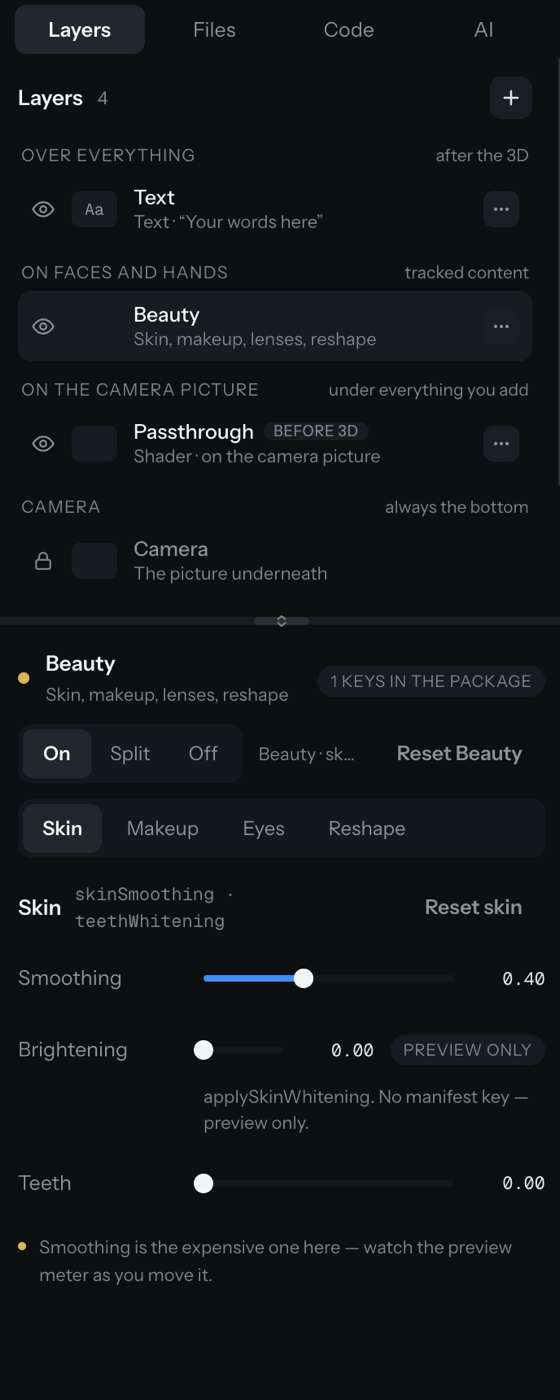
What ships versus what is preview-only
The exported package carries exactly six beauty controls: skinSmoothing, teethWhitening, reshape, lipstick, eyeshadow, blusher. Everything else drives the live preview but is not written to the package, and the panel says so on the control. Use preview-only controls to judge a look, but remember they will not appear on a device.
Skin
- Smoothing (ships): softens skin. Start low,
0.25to0.40. It is the most expensive beauty control, so watch the performance meter as you raise it. - Brightening (preview only): lifts skin tone.
- Teeth (ships): whitens teeth,
0.15to0.30is a natural range.
Most beauty sliders run 0.0 (off) to 1.0 (maximum). Maximum is useful for testing but often looks artificial.
Makeup
Nine makeup layers, each badged with whether it ships:
| Makeup | Ships? | Controls |
|---|---|---|
| Lipstick | Yes | Style (Classic, Matte, Natural), preset colour, opacity (preview) |
| Eyeshadow | Yes | Style (Smokey, Shimmer, Natural), preset colour, opacity (preview) |
| Blush | Yes | Style (Round, Contour, Natural), preset colour, opacity (preview) |
| Eyelashes | Preview only | On, style |
| Eyebrows | Preview only | On, colour |
| Eyeliner, Contour, Foundation, Custom artwork | Planned | Shown off, with the reason |
A free colour previews through an RGB value, but it exports as the nearest preset colour, and the control notes this on the row. For a colour that ships exactly, choose a preset.
Eyes
Eye-colour lenses: on or off, a colour, and a strength. Lenses are preview only in this version; they change the preview but are not written to the package.
Reshape
Twenty-seven signed sliders that reshape the face. Zero leaves a feature untouched; a negative value moves it the opposite way. Each slider's hint says which way is positive.
The first ten ship to every platform. The other seventeen add detail to the brows, eyes, nose, cheeks, chin, forehead and mouth. Studio, iOS, Android and the web SDK render them. Brow length, brow tilt, forehead width and the frown side of Smile are Studio previews only: the SDKs ignore them until they have been hand-tested. They need the Head mesh warp and are disabled on Classic.
| Control | Range |
|---|---|
| Lip | -1.0 to 1.0 |
| Face slim | -1.0 to 1.0 |
| Eye size | -1.3 to 1.3 |
| Nose | -0.5 to 0.5 |
| Chin | -0.85 to 0.85 |
| Eyebrow position | -1.0 to 1.0 |
| Eyebrow thickness | -1.0 to 1.0 |
| Jaw width | -1.0 to 1.0 |
| Mouth width | -0.7 to 0.7 |
| Forehead | -1.0 to 1.0 |
| Brow arch | -1.0 to 1.0 |
| Brow length (Studio only) | -1.0 to 1.0 |
| Brow spacing | -1.0 to 1.0 |
| Brow tilt (Studio only) | -1.0 to 1.0 |
| Eye spacing | -1.0 to 1.0 |
| Eye tilt | -1.0 to 1.0 |
| Nose width | -1.0 to 1.0 |
| Nose length | -1.0 to 1.0 |
| Nose bridge | -1.0 to 1.0 |
| Nose tip | -1.0 to 1.0 |
| Cheekbones | -1.0 to 1.0 |
| Chin width | -1.0 to 1.0 |
| Forehead width (Studio only) | -1.0 to 1.0 |
| Mouth position | -1.0 to 1.0 |
| Smile | -1.0 to 1.0 |
| Upper lip | -1.0 to 1.0 |
| Lower lip | -1.0 to 1.0 |
Stacking several sliders on the same feature (the nose, the brows and forehead, the mouth) eases off automatically once the skin would distort, so past that point turning one more up shifts the balance rather than adding more. The mouth and nose share the skin above the lip, so stacking them eases both; Chin counts toward the mouth's limit but is never eased itself. A single slider is never eased off.
Upper lip and lower lip add to Lip; the two together stop at Lip's range, so with Lip at its maximum they have no further effect. Smile below zero is a frown: the mouth corners go down, taking the skin right beside them along, while the cheeks above stay. The frown is a Studio preview only for now.
Forehead lowers the hairline about 60% as far as it raises it, so the skin above the brows is not squeezed.
Compare and reset
The inspector has a Compare control (On, Split, Off) to see the face with and without beauty, and a two-step Reset Beauty to clear the layer.
Verify it worked
- Beauty effects appear on the face in the preview when a face is detected, and hide when the face leaves the view.
- The header badge shows how many beauty keys are in the package.
- A preview-only control changes the preview but is labelled as not shipping.
Common problems
| What you see | Why | Fix |
|---|---|---|
| Beauty is invisible | No face is detected | Show a face to the camera; tracked beauty appears only on a face |
| A colour looks different after export | A free colour exports as the nearest preset | Choose a preset colour for an exact match |
| A control changed the preview but not a device | It is preview only, not written to the package | Use one of the six shipping controls for on-device beauty |
| The frame rate drops when smoothing is high | Skin smoothing is the most expensive beauty stage | Lower smoothing, and check the Performance view |
