



Overview
Export turns a filter into a .nosmai package, the file the Nosmai SDK runs. The export dialog always writes that package and can also produce preview media (an mp4, an animated webp, a gif, and a poster frame) and a metadata file, all in one folder named after the filter.
Product: Nosmai Studio · Platform: macOS, Windows · Updated: 6 October 2026 · Reading time: 8 minutes
Prerequisites
- A filter with at least one layer that has its source set (export refuses an empty media or model source).
- An output folder you can write to.
- For a preview video, a camera or video preview source (a still image produces only the poster frame).
Export
- Press Export in the top bar. The export dialog opens.
- Choose an output folder.
- Choose which files to create (see below). The
.nosmaipackage is always on. - Fill in the distribution details (see Distribution metadata).
- Press Export.
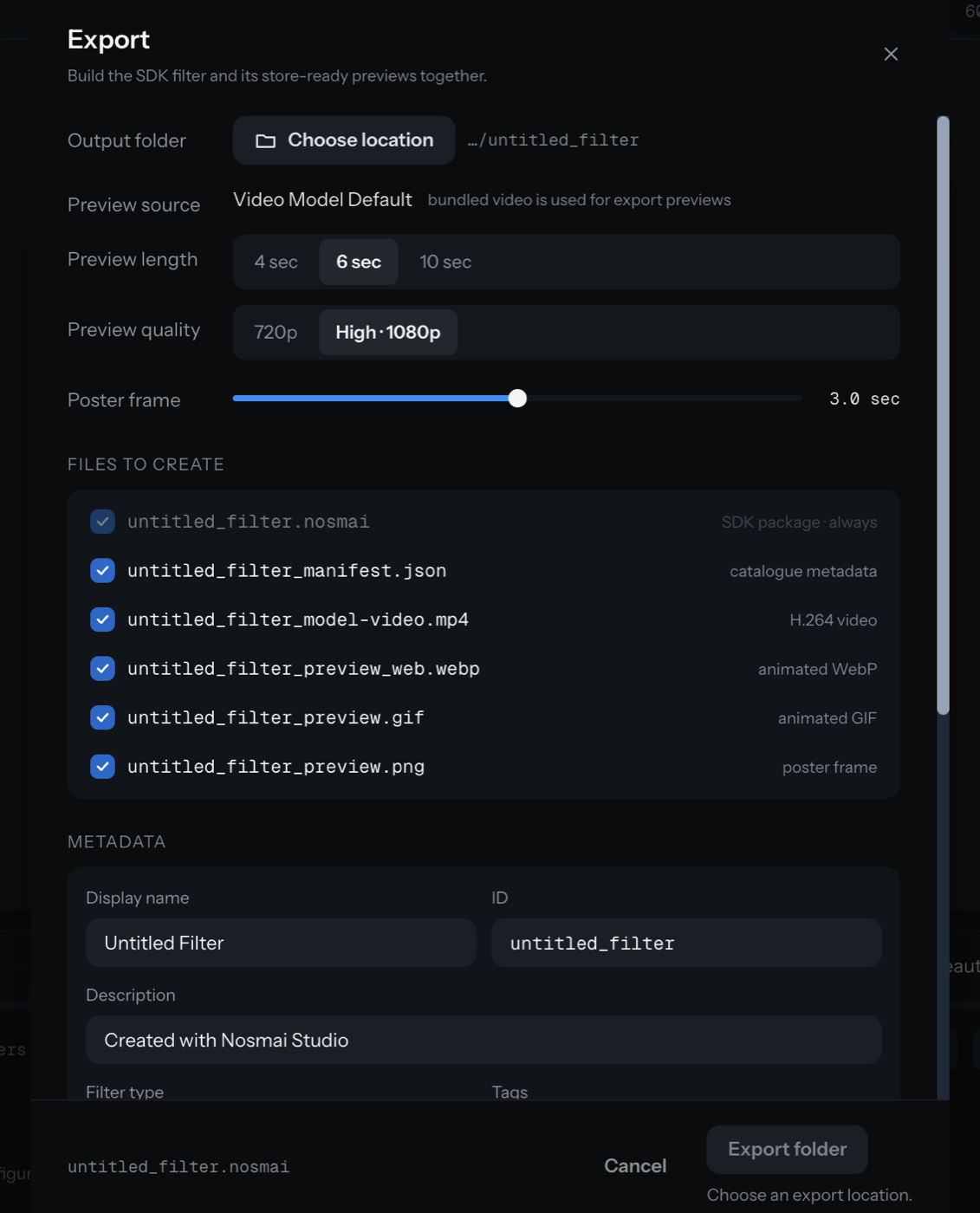
Files it can create
All files land in a folder named after the filter's ID:
| File | What it is |
|---|---|
<id>.nosmai | The SDK package. Always produced |
<id>_manifest.json | Catalogue metadata (optional) |
<id>_<video>.mp4 | An H.264 preview video (optional) |
<id>_preview_web.webp | An animated WebP preview (optional) |
<id>_preview.gif | An animated GIF preview (optional) |
<id>_preview.png | A single poster frame (optional) |
When the preview source is a still image, the mp4, webp, and gif are disabled and only the PNG is produced.
Export settings
- Preview source: the current camera, bundled, or imported media. For a camera source, a bundled video is used for the export previews.
- Preview length: 4, 6, or 10 seconds.
- Preview quality: 720p (realtime) or High (1080p).
- Poster frame time: where in the preview the PNG is taken.
- Overwrite: whether to replace existing files in the folder.
- A performance card shows the filter's verdict before you export. It is advice only and never blocks the export.
Verify it worked
- The output folder contains a
.nosmaifile. - Any preview files you selected are in the same folder, named after the filter ID.
- The dialog closed without an error.
Common problems
| What you see | Why | Fix |
|---|---|---|
| Export is disabled | A required metadata field is empty, or no output folder is set | Choose a folder and complete name, ID, author, and type |
| Only a PNG was produced | The preview source is a still image | Use a camera or video source for the mp4, webp, and gif |
| Export refused with an empty source | A media or model layer has no file | Set the source in that layer's inspector, or remove the layer |
| The package will not load on a device | A referenced asset was missing at export | Check the Files panel, re-import the asset, and export again |
