



Overview
The right panel in Nosmai Studio has Layers, Files, and Code tabs. Layers is where you build and arrange the filter; Files lists its assets; Code holds parameters, shaders, and scripts. Code appears only in Everything mode.
Product: Nosmai Studio · Platform: macOS, Windows · Updated: 6 October 2026 · Reading time: 6 minutes
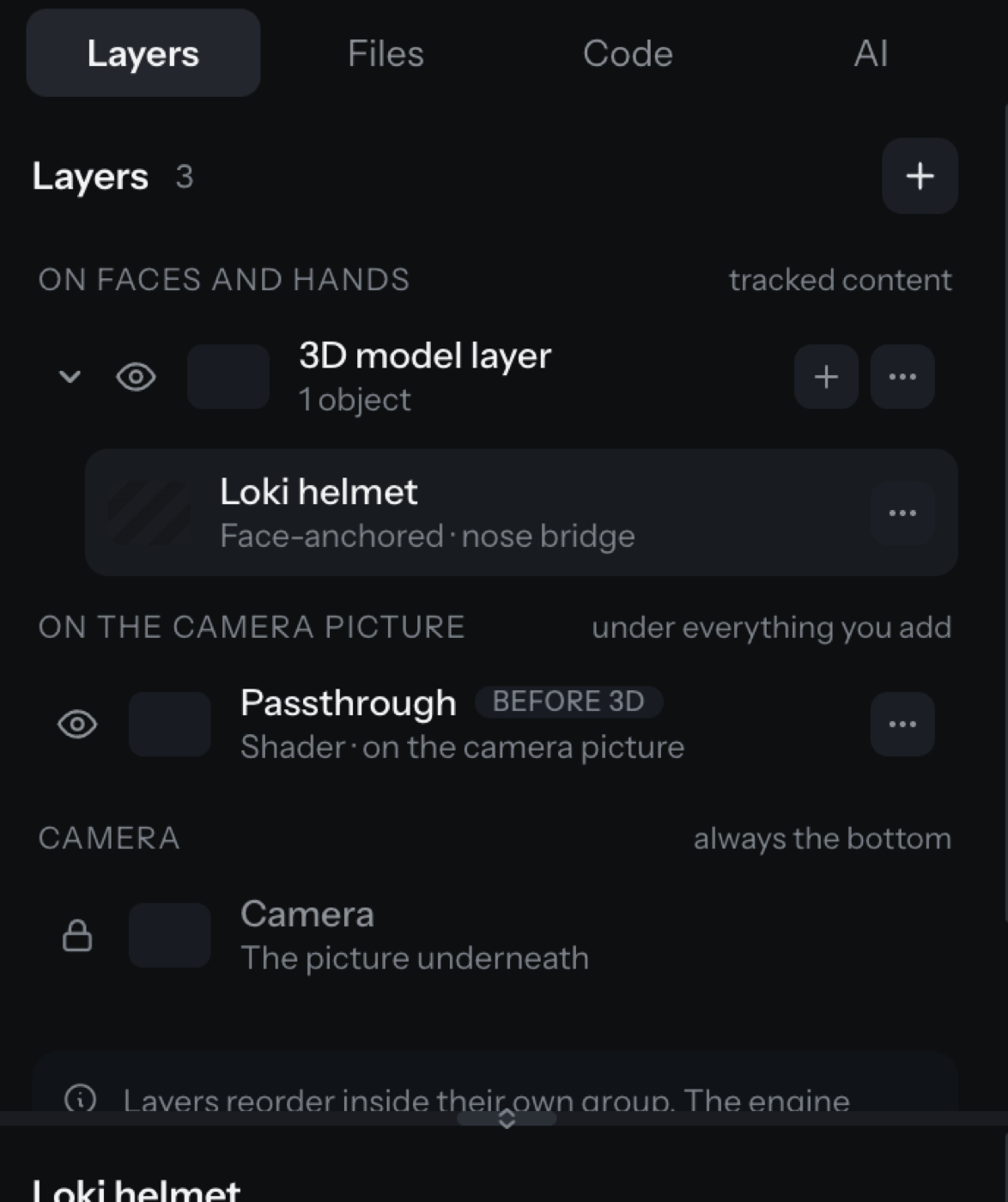
Layers
The Layers tab lists every layer in the filter, grouped by where it draws:
| Group | Meaning |
|---|---|
| Over everything | Draws last, after the 3D stage |
| On faces and hands | Tracked content that follows a face or hand |
| On the camera picture | Draws under everything you add |
| Sound | Has no draw order |
| Camera | Always the bottom |
Each row has an eye to show or hide the layer and a menu to rename, duplicate, or remove it. The + at the top opens the add-a-layer sheet. See Add a layer.
Below the list is the inspector, which shows the settings for the selected layer. Pick a layer and its controls appear there. A splitter between the list and the inspector lets you resize them.
Files
The Files tab lists the assets the project uses: images, models, LUTs, fonts, audio, scripts, and shaders. It is where the project's own files live. Studio has no shared asset library in this version, so files belong to the project that imported them.
Code
The Code tab appears only in Everything mode. It has three parts:
- Values your app can set (runtime parameters): named values a host app can change while the filter runs, each with a type, a range, and a note about what uses it.
- Shaders: the GLSL files in the filter, each with its attach point (before 3D, after 3D, or a face mask), opened in the shader editor.
- Scripts: the Lua scripts, each badged with whether it runs on start, never runs, or has errors. Studio has no Lua interpreter, so scripts run on a device through live preview rather than inside Studio.
Verify it worked
- The Layers tab lists your layers grouped by draw stage.
- Selecting a layer shows its inspector below the list.
- The Code tab is present in Everything mode and absent in Guided mode.
Common problems
| What you see | Why | Fix |
|---|---|---|
| The inspector says "Nothing selected" | No layer is selected | Click a layer in the list above |
| The Code tab is missing | You are in Guided mode | Switch to Everything in the top bar |
| A script is badged "never runs" | It is not the filter's entry script, or the filter is not a game | Set the filter to run as a game, or make the script the entry point |
| An asset is in Files but not used | No layer references it | Remove it, or point a layer at it, to avoid shipping dead weight |
