



Overview
The Code panel is where advanced, code-first work lives: runtime parameters a host app can set, shaders in GLSL, and Lua scripts for games. It is available in Everything mode. Scripts run on a device through the live preview, because Studio has no Lua interpreter of its own.
Product: Nosmai Studio · Platform: macOS, Windows · Updated: 6 October 2026 · Reading time: 10 minutes
Prerequisites
- A project open in the editor.
- Everything mode (see Modes and views).
Open the Code panel
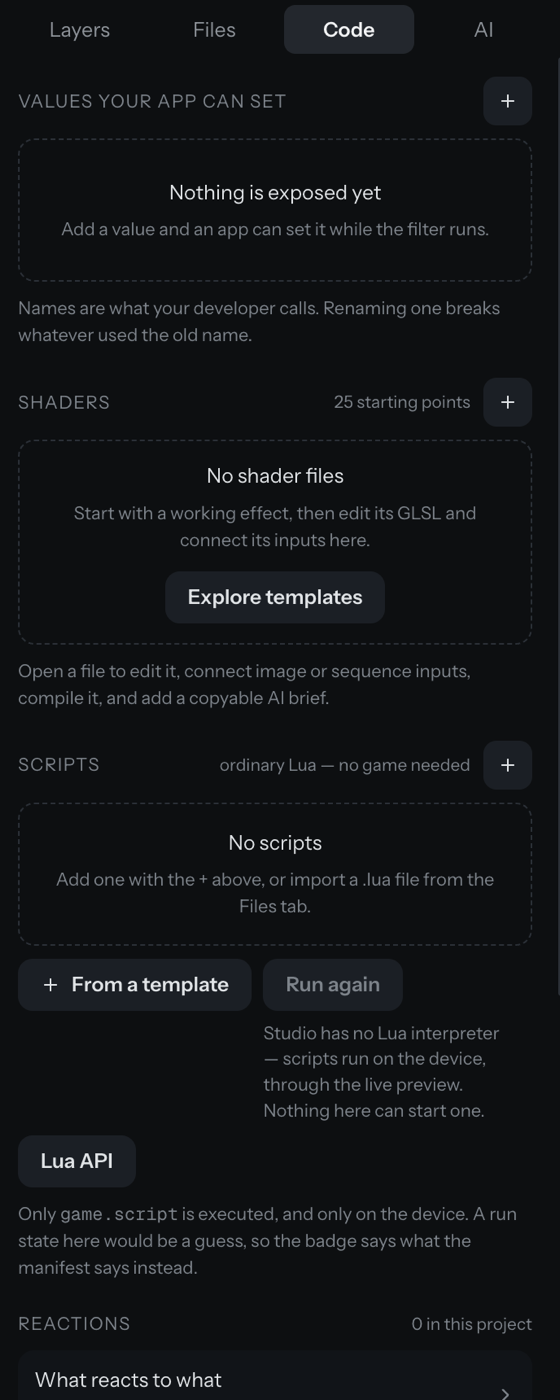
Switch the right panel to the Code tab. It has three sections.
Runtime parameters
A runtime parameter is a named value a host app can set while the filter runs:
- In Values your app can set, press + and name the value, with a type and a range.
- The panel shows what uses each value, and warns about a value nothing uses.
- Renaming a value breaks whatever used the old name, so the panel plans the rename for you.
A value used in a script but never declared appears as "used but never declared" with a one-click Declare it.
Shaders
In Shaders:
- Each shader file shows its attach point: before 3D, after 3D, or a face mask.
- Open a file to edit its GLSL, connect image or sequence inputs, compile it, and copy a brief you can paste into an external assistant.
- New shader from a template opens a wizard with working starting points.
Scripts and games
In Scripts:
- Each
.luafile is badged "runs on start", "never runs", or with an error count. - Add a script, or import a
.luafrom the Files tab, or start From a template. - Studio has no Lua interpreter, so "Run again" is disabled. Scripts run on a device through the live preview.
- A Lua API reference lists the callbacks and
nosmai.*namespaces.
To make a script actually execute, set the filter to run as a game, which sets its type so the engine starts the Lua runtime. Without that, a script ships but never runs.
Game text that shows on screen
A game script writes to text slots (a score, lives, a status, a countdown). If a slot has no matching text layer, nothing shows. The panel detects the slots a script writes, cross-references the text layers, flags the missing ones, and offers Create the missing text layers in one click. This is the most common fix for "my game text will not show".
Verify it worked
- A declared parameter lists what uses it.
- A shader compiles without an error in the editor.
- A game script is badged "runs on start" once the filter runs as a game.
- Detected text slots all have a matching text layer.
Common problems
| What you see | Why | Fix |
|---|---|---|
| The Code tab is missing | You are in Guided mode | Switch to Everything in the top bar |
| "Run again" is disabled | Studio has no Lua interpreter | Preview on a device; the script runs there |
| A script is badged "never runs" | The filter is not a game, or the script is not the entry | Set the filter to run as a game, and make it the entry script |
| Game text does not appear | A written slot has no text layer | Use "Create the missing text layers" in the Code panel |
